


 Home > Articles > Download Spotify Lossless
Can You Download Spotify in Lossless Format? The 2026 Answer
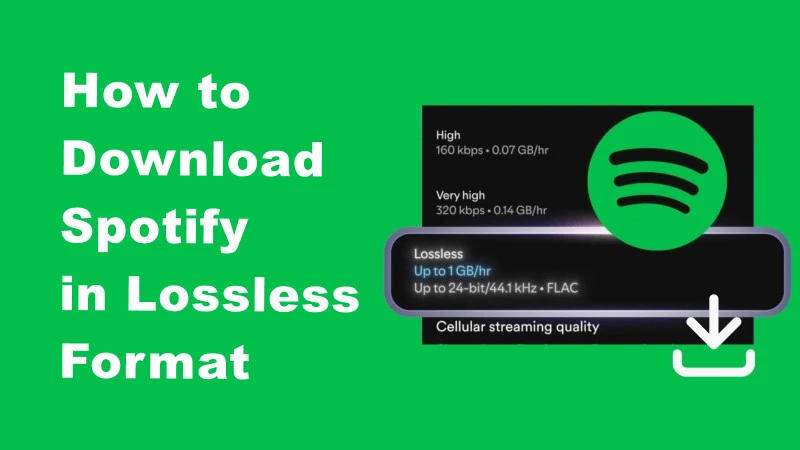
Other platforms have offered lossless audio for years. Spotify kept us waiting, but finally delivered in September 2025. Now Premium subscribers get true CD-quality streaming at up to 24-bit/44.1 kHz FLAC format at no extra cost.
This 2026 guide shows exactly how to enable lossless streaming, download tracks in FLAC format (both officially and through reliable tools), and optimize your setup, whether you're an audiophile or just want to get your money's worth from Premium.
Part 1: What is Lossless Music
Lossless music refers to audio files that retain 100% of the original sound data, unlike compressed formats such as MP3 or AAC, which remove certain details to reduce file size.
Popular Lossless Formats:
- FLAC (Free Lossless Audio Codec): Widely supported, retains full CD-quality audio.
- ALAC (Apple Lossless Audio Codec): Ideal for Apple devices.
- WAV: Uncompressed, often used in professional audio settings.
Why it matters: Lossless files allow listeners to experience the full range of instruments, vocals, and subtle details that lossy formats often discard. For audiophiles, this makes a noticeable difference, especially on high-quality headphones or speakers.
Part 2: Spotify Audio Quality Options
Spotify offers multiple streaming quality tiers to suit different needs and network conditions:
Standard Quality Tiers:
- Low (24 kbps) – Designed for extreme data saving on mobile networks
- Normal (96 kbps) – Standard streaming quality for casual listening
- High (160 kbps) – Enhanced quality for Premium subscribers
- Very High (320 kbps) – Premium tier offering the highest lossy quality
Lossless Quality (2025 Update):
- Lossless (up to 24-bit/44.1 kHz FLAC) – True CD-quality streaming launched in September 2025, now available in over 50 markets including the US, UK, Germany, Japan, and Australia.
Part 3: How to Download Spotify Music in Lossless FLAC Format
With the rise of high-fidelity streaming, Spotify users are eager to enjoy music in lossless formats. Below, we provide a step-by-step guide to downloading and enjoying Spotify tracks in the highest possible audio quality.
Official Spotify Method
Premium subscribers can now download tracks in lossless quality directly through the Spotify app, addressing a long-standing request from audiophiles.
How to Enable Lossless Downloads:
- 1. Open Spotify and go to Settings
- 2. Navigate to Audio Quality settings
- 3. Select Lossless for your preferred scenarios: Wi-Fi streaming, Mobile data streaming, Downloads (offline playback)
- 4. Download your favorite playlists and albums to enjoy offline in full lossless quality
Key Features:
- Available on mobile, desktop, tablets, and Spotify Connect-enabled devices (Sony, Bose, Samsung, Sennheiser, etc.)
- Flexible settings allow different quality levels for different connection types
- No extra subscription fee beyond Premium
Important Considerations:
- Downloaded files remain protected and can only be played within the Spotify app
- Lossless files require significantly more storage: approximately 30-50 MB per song vs. 3-5 MB for 320 kbps
- A stable internet connection is recommended for initial downloads
With official lossless support, Premium users no longer need third-party tools to access high-quality audio from Spotify.
Using a Spotify Music Converter (Locally Saved)
If you want to enjoy Spotify tracks in lossless audio formats like FLAC outside of Spotify, one convenient option is using a Spotify music converter.
KeepMusic Spotify Music Converter is a reliable tool that allows Premium users to convert Spotify songs, playlists, and albums into high-quality formats such as FLAC, WAV, or AAC for offline playback.
With this Spotify Music Converter, you can:
- Maintain original audio quality during conversion
- Keep ID3 tags for easy library management
- Listen offline on any device
This makes it a great solution for users who want lossless Spotify music offline anywhere, anytime.
⚠️ Avoid illegal Spotify download tools. Unauthorized downloading may violate copyright laws and Spotify’s terms of service. Stick to official or licensed platforms for legal and safe high-quality music.
Tips for High-Quality Listening Experience
Even after obtaining lossless files, proper setup ensures the best audio experience:
- 1. Use High-Quality Headphones or Speakers: Invest in devices capable of reproducing full frequency range.
- 2. Optimize Player Settings: Choose the highest possible playback quality.
- 3. Balance Storage vs Quality: Lossless files are large; ensure your device has enough storage.
- 4. Consider a DAC (Digital-to-Analog Converter): Improves audio clarity for hi-fi setups.
FAQs About Spotify Lossless Music
Q: What is Spotify Lossless?
A: Spotify Lossless is a new, premium audio quality tier that delivers the highest music audio quality on Spotify. It streams tracks in up to 24-bit/44.1 kHz FLAC format, unlocking a richer and more detailed listening experience by preserving every detail of the original recording.
Q: Who has access to Lossless audio?
A: Lossless audio is exclusively available to Spotify Premium subscribers. It is currently rolling out to users in select markets.
Q: How can I turn on Lossless audio?
A: To enable Lossless, follow these steps in the Spotify app:
- Tap your profile icon in the top left.
- Go to Settings & Privacy → Media Quality.
- Select where you want to enable Lossless: for Wi-Fi, cellular, or downloads.
- You will need to enable it manually on each device.
Q: How do I know if Lossless is active?
A: When Lossless is enabled, a Lossless indicator will appear in the Now Playing view (or bar) and in the Connect Picker.
Q: On which devices and platforms is Lossless available?
A: Lossless is supported on the Spotify mobile app (iOS & Android), desktop, and tablet, as well as on many devices that support Spotify Connect (including speakers and players from Sony, Bose, Samsung, Sennheiser, and others). Support for additional brands like Sonos and Amazon is coming soon.
Q: How can I download Spotify lossless tracks to my local drive?
A: While Spotify doesn't permit direct downloads in Lossless FLAC, KeepMusic Spotify Music Converter bridges the gap. This tool downloads and converts any Spotify song or playlist into lossless FLAC or other popular formats while preserving the source audio quality. This way, you can enjoy your Lossless discoveries anywhere, on any device.
Q: Can I listen to Lossless over Bluetooth?
A: Currently, Bluetooth technology does not provide enough bandwidth to transmit lossless audio without compression. For the best experience, we recommend using a Wi-Fi connection with wired headphones or speakers via Spotify Connect.
Q: Why is there a delay when I play a Lossless track?
A: Lossless audio files are larger and contain more data. When you first play a track, it may take a moment to load and cache. Once cached, playback will be smooth.
Q: Does Lossless use more data?
A: Yes. Because Lossless offers higher audio quality, it consumes more data. In the Media Quality settings, you can see the estimated data usage for each quality level, including Lossless, to help you make an informed choice.
Q: In which countries is Lossless available?
A: Lossless is being rolled out gradually. It is now available to Premium users in over 50 markets, including the United States, United Kingdom, Australia, Germany, Japan, Sweden, and more.
Q: Is there an extra cost for Lossless?
A: No, Lossless is included at no additional cost for all Spotify Premium subscribers.
Final Words
Spotify's lossless audio brings the platform in line with competitors like Apple Music and Tidal, delivering true CD-quality streaming to Premium users at no additional cost. For most listeners, Spotify's official method provides everything needed for high-quality audio. If you need more flexibility, tools like KeepMusic Spotify Music Converter offer practical solutions for offline playback across devices.
Remember that lossless audio delivers its full potential only with quality headphones or speakers and adequate storage space. As Spotify expands lossless availability globally, now is the ideal time to explore what Premium truly offers and rediscover your favorite music with exceptional clarity and detail.

Hanna Ellis
Hanna Ellis loves everything about music and multimedia. She shares her insights on audio tech, streaming services, and digital media trends through articles and blog posts, helping readers stay updated with the latest in the industry.