


 Home > Free Spotify Podcast Downloader
Top 8 Free Spotify Podcast Downloaders to Download Spotify Podcasts to MP3

Spotify boasts a vast library of high-quality podcasts, but it doesn't support direct MP3 downloads, which is inconvenient for many users who want to play audio files offline. If you want to play them on other devices freely, you'll need a Spotify Podcast Downloader. This article recommends the top 8 free Spotify Podcast downloaders to help you easily save your favorite podcasts to MP3 for unlimited offline playback.
- No 1: 👍KeepMusic - Download Spotify Podcasts from 10,000+ Podcast Sites to MP3
- No 2: PodcastToMP3
- No 3: PodcastMP3
- No 4: PasteDownload
- No 5: Podbay.fm
- No 6: Video DownloadHelper
- No 7: SpotiFlyer
- No 8: Audacity
- Comparison: Which Spotify Podcast Downloader is Best for You
- FAQs about Spotify Podcast to MP3 Downloader
No 1: KeepMusic - Download Spotify Podcasts from 10,000+ Podcast Sites to MP3
KeepMusic is a powerful podcast downloader that supports downloading podcasts from 10,000+ podcast websites and converting them to MP3 format for free. It also offers batch downloading, allowing you to download multiple episodes or entire podcast series at once at up to 10× faster speed. With its simple interface and efficient performance, KeepMusic provides an easy way to save your favorite podcasts for offline listening.
KeepMusic Free Podcast to MP3 Downloader
| Working Systems | Output Format | Best Quality | Metadata | Ads-free | Speed | Batch Download | Rating |
| Windows & Mac | MP3 | Lossless audio(24-bit/44.1 kHz FLAC) | ✅ | ✅ | 10× | ✅ | 🌟 🌟 🌟 🌟 🌟 |
|
Pros✅ Batch high-speed download Supports 10,000+ podcast websites Completely free to download podcasts to MP3 |
Cons⚠️
Desktop only |
How to Download Spotify Podcasts to MP3?
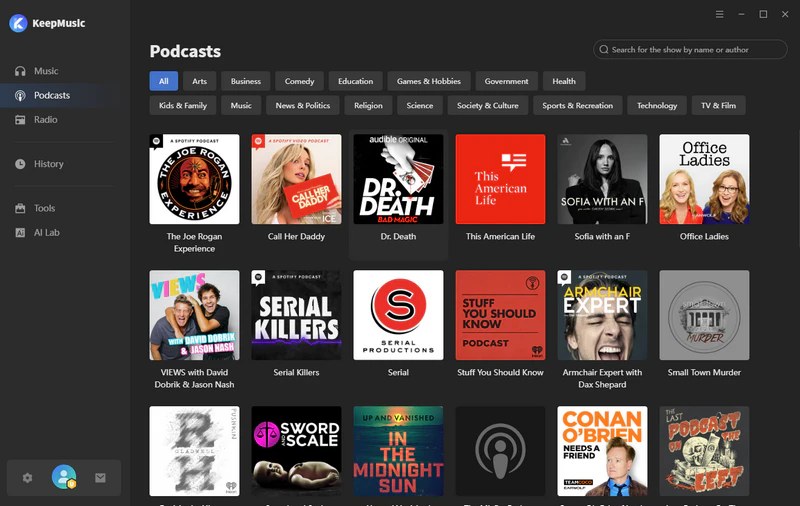
Step 1 Open KeepMusic on your computer and go to the podcast section. You will see all the podcasts that are available for download. Choose podcasts with the Spotify logo or manually search by name or author.
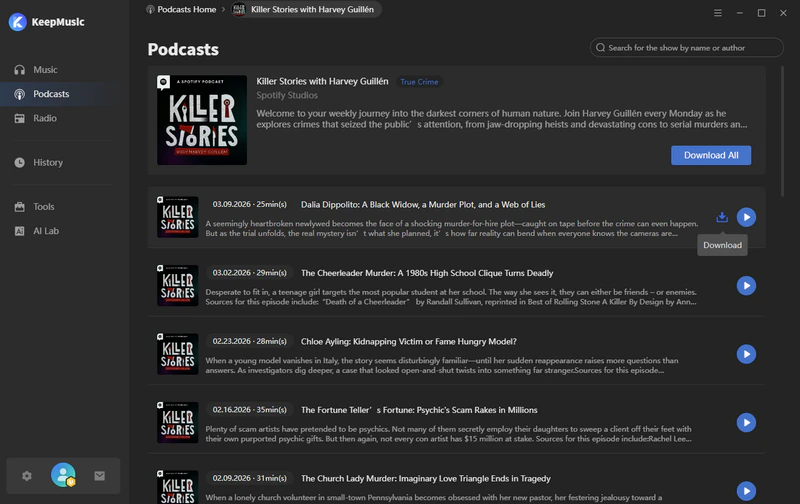
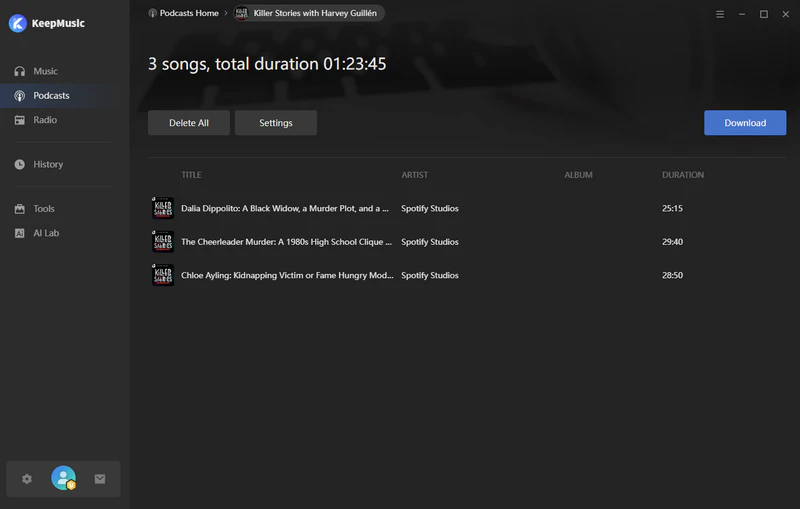
Step 2 Once on the podcast's details page, click the "Download All" button next to the episode download button.
Step 3 Click the settings button to customize your output file name.
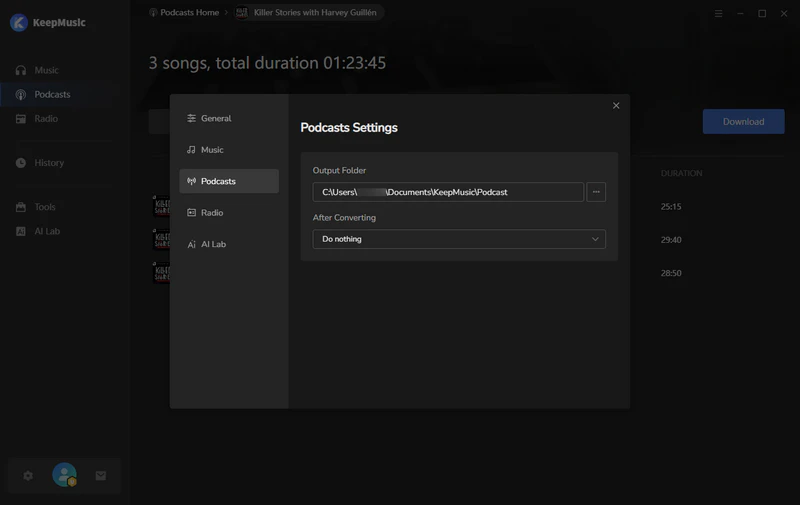
Step 4 Click the download button, and KeepMusic will save your Spotify podcast to your local computer at 10× speed.
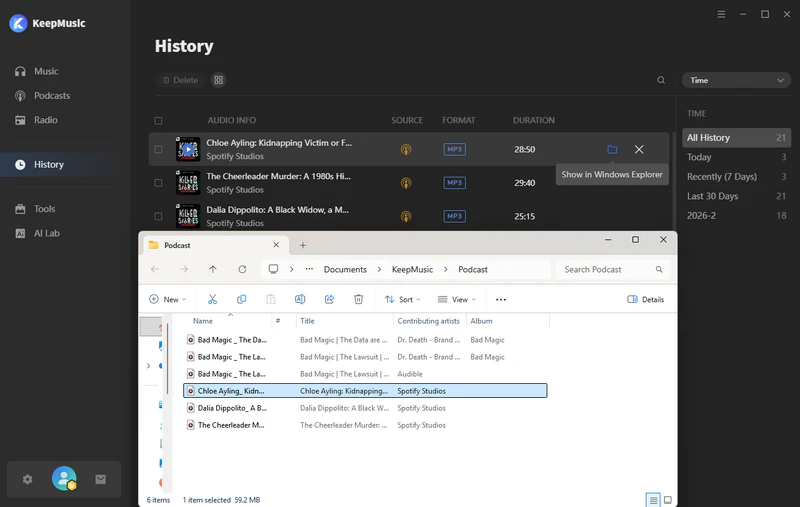
Step 5 After the download is complete, go to the history section and click the file button next to the episode to locate the downloaded file.
No 2: PodcastToMP3
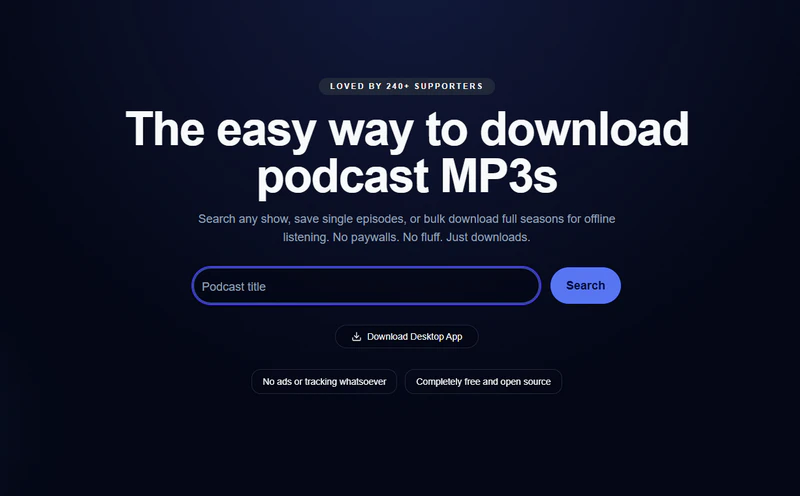
PodcastToMP3 is a simple and easy-to-use online podcast downloader that requires no software installation or account registration. Simply enter the podcast name in the website's search bar to quickly find the corresponding program and download it directly to MP3 format. The tool supports batch downloads, but the maximum batch size is 100 episodes. It's suitable for temporarily downloading podcasts.
| Working Systems | Output Format | Best Quality | Metadata | Ads-free | Speed | Batch Download | Rating |
| All Web: https://podcasttomp3.com/ | MP3 | 256kbps | ✅ | ✅ | 5× | up to 100 | 🌟 🌟 🌟 |
|
Pros✅ No installation required Completely free and easy to use |
Cons⚠️
Batch download has limitations Slow download speed for long podcasts |
How to Download Spotify Podcast to MP3 with PodcastToMP3?
Step 1 Open PodcastToMP3 in your browser and enter the title of the Spotify podcast you want to download.
Step 2Click the download button next to the podcast to save it to your computer, or you can click the "Bulk download" button and enter a number between 1 and 100 to download podcasts in bulk.
No 3: PodcastMP3
PodcastMP3 is a free online podcast downloader. This podcast downloader supports downloading podcasts from multiple platforms, including Spotify, Apple Podcasts, Pocket Casts, and Overcast, in MP3 format. No login or install is required, and it's simple to use—just copy and paste the podcast link into the search box to download the podcasts. It's ideal for users who want to quickly save podcasts for offline listening.

| Working Systems | Output Format | Best Quality | Metadata | Ads-free | Speed | Batch Download | Rating |
| All web: https://podcastmp3.com/ | MP3 | 256kbps | ✅ | ✅ | 7× | ❌ | 🌟 🌟 🌟 |
|
Pros✅ Simple to operate Supports multiple platforms |
Cons⚠️
Unstable download speed Only download one podcast at a time |
How to Use Podcast MP3 Downloader?
Step 1 Go to the podcast platform (such as Spotify or Apple Podcasts) and copy the link to the podcast you want to download.
Step 2Paste the copied link into the PodcastMP3 input box and then click the download button.
Step 3Wait for the download link to be generated, then click the "Download now" button to save it to your computer or mobile device.
No 4: PasteDownload
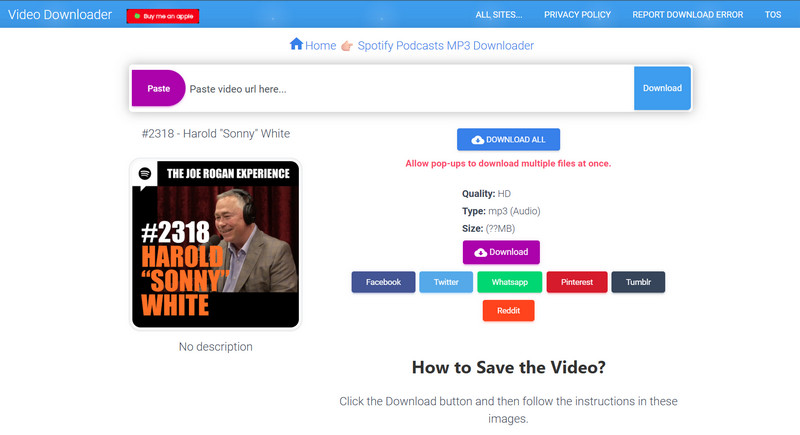
PasteDownload is a free online tool for downloading Spotify podcasts. This tool typically supports downloading podcasts in MP3 audio or MP4 video format. No software installation or account registration is required, and it works on both desktop and mobile browsers. While the overall operation is simple, download speeds may be slow, and it only supports publicly available podcasts; it cannot download shows available to Spotify Premium.
| Working Systems | Output Format | Best Quality | Metadata | Ads-free | Speed | Batch Download | Rating |
| All web: https://pastedownload.com/spotify-podcast-downloader/ | MP3 | 256kbps | ✅ | ❌ | 5x | ❌ | 🌟 🌟 |
|
Pros✅ Free online use Simply paste the Spotify Podcast link to parse and download |
Cons⚠️
With Ads Frequent parsing failures Download speed is slow and batch download is not supported |
How to Use Podcast MP3 Downloader?
Step 1 Copy the public Spotify podcast link and paste it into the pastedownload search box.
Step 2Click the download button and wait for the download link to be generated.
Step 3Select the MP3 audio option, and then click to save it to your local device.
No 5: Podbay.fm
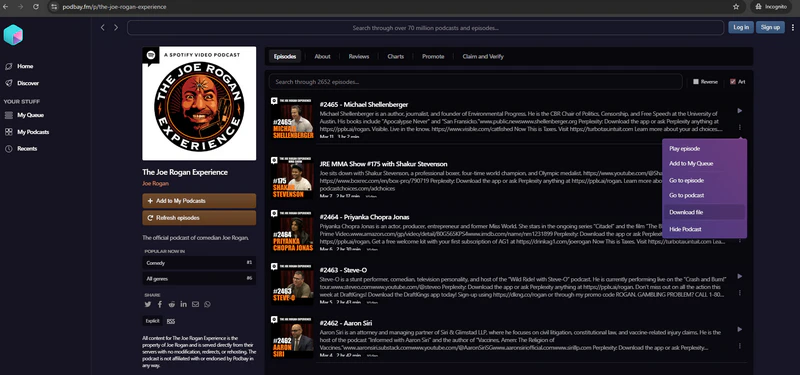
Podbay is a free online podcast platform that aggregates a large number of shows from platforms such as Spotify and Apple Podcasts. You can search, play, and manage various podcast shows directly in your browser. Most podcast files are typically provided in MP3 format, offering high compatibility and direct playback on computers, mobile phones, or MP3 players. For users who want to save Spotify podcast videos for free, Podbay is also frequently used as a free source for finding and streaming podcast content online.
| Working Systems | Output Format | Best Quality | Metadata | Ads-free | Speed | Batch Download | Rating |
| All web: https://podbay.fm/ | MP3 | 256kbps | ✅ | ✅ | 5× | ❌ | 🌟 🌟 🌟 |
|
Pros✅ Abundant podcast resources Supports playback speed adjustment and program subscription |
Cons⚠️
Limited sound quality Batch download is not supported |
How to Use Podcast MP3 Downloader?
Step 1 Visit the official Podbay website (https://podbay.fm/).
Step 2Enter the name or keywords of the Spotify podcast you want to find in the search bar.
Step 3Click on the corresponding podcast program in the search results.
Step 4Click the three dots next to a specific podcast, select "Download files", and you can save the podcast to your local device as an MP3 file.
No 6: Video DownloadHelper
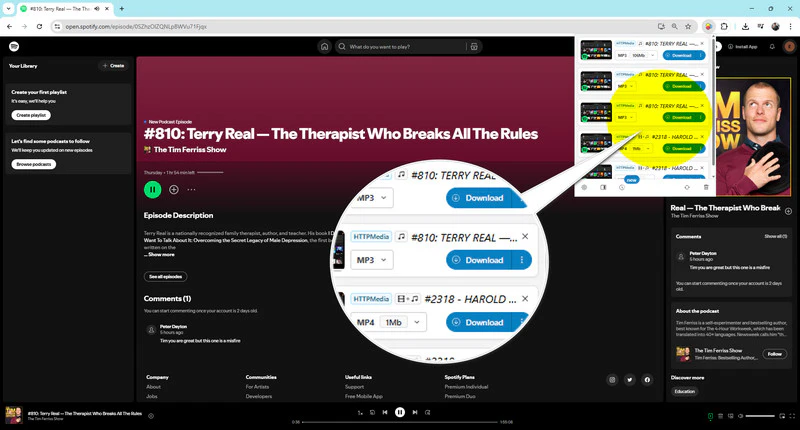
Video DownloadHelper is a popular browser extension available for Chrome and Firefox that helps you download video and audio content from web pages. Video DownloadHelper supports a variety of websites and can download media in MP3 and MP4 formats. When you play online podcasts, videos, or other media, the extension automatically detects the media resources on the page and provides download options. Simply click the extension icon to save the media file to your local device. It's also a practical solution for downloading Spotify podcasts.
| Working Systems | Output Format | Best Quality | Metadata | Ads-free | Speed | Batch Download | Rating |
| Chrome Browser | MP3/MP4 | 320kbps | ✅ | ✅ | fast | ❌ | 🌟 🌟 🌟 |
|
Pros✅ Works on many websites Easy to install and use |
Cons⚠️
Limited functionality No batch download |
How to Use Video DownloadHelper to Download Spotify Podcasts to MP3?
Step 1Install the Video DownloadHelper extension in your browser.
Step 2Open Spotify Web Player and play the podcast you want to download, then click the extension icon in your browser’s toolbar.
Step 3Click the Video DownloadHelper icon, and it will automatically detect the currently playing audio file.
Step 4Select the MP3 file from the pop-up list, and then click Download.
No 7: SpotiFlyer
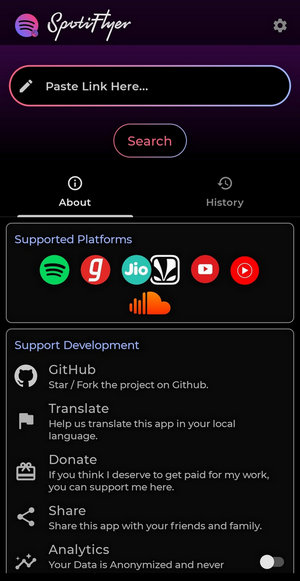
For Android users looking to download Spotify podcasts, SpotiFlyer is a very convenient tool. Whether you're a Spotify free or premium user, SpotiFlyer supports downloading Spotify podcasts as MP3s while retaining complete ID3 tags, but its audio quality is limited to 128kbps. Therefore, it's more suitable for users who don't have high requirements for audio quality and want to quickly save podcasts.
| Working Systems | Output Format | Best Quality | Metadata | Ads-free | Speed | Batch Download | Rating |
| Android, Mac, Windows, Linux | MP3 | 128kbps | ✅ | ✅ | fast | ❌ | 🌟 🌟 🌟 |
|
Pros✅ Completely free to use No Spotify Premium required |
Cons⚠️
Not supported for iPhone users Batch download is not supported Only 128kbps audio quality is supported |
How to Download Spotify Podcasts to MP3 with SpotiFlyer?
Step 1Download and install the SpotiFlyer app on your Android phone(https://spotiflyer.app/spotiflyer-mod-apk/) or computer(https://www.spotiflyer.app/).
Step 2Open Spotify, find the podcast you want to download, and then copy the podcast's share link.
Step 3Launch SpotiFlyer and paste the copied Spotify Podcast link into the search bar and click search.
Step 4Click the Download button and the podcast will start downloading directly to your local device.
No 8: Audacity
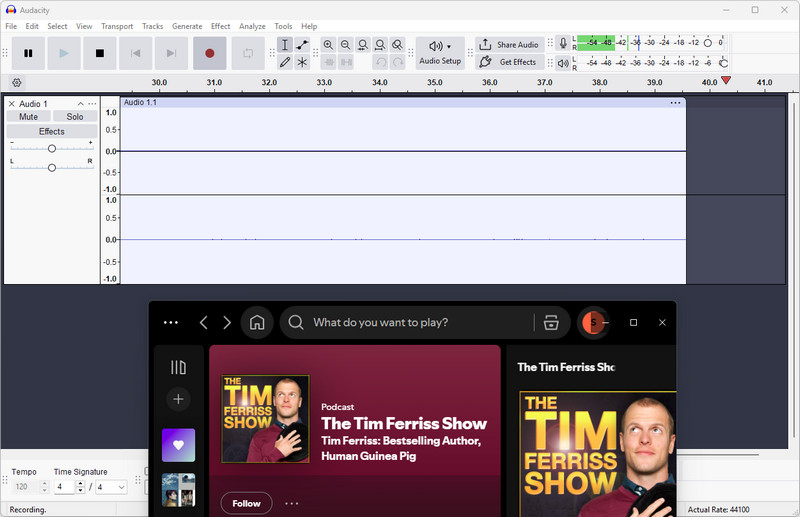
Audacity is a free and open-source audio editing software that supports Windows, Mac, and Linux systems. While it's not a dedicated Spotify Podcast downloader, you can record and save playing Spotify Podcasts as local audio files using the system's recording function. Audacity supports exporting to various audio formats such as MP3, WAV, or FLAC, and offers editing features like trimming, noise reduction, and audio editing for further processing of your recorded podcast content. Audacity is a viable solution for saving and managing Spotify Podcasts.
| Working Systems | Output Format | Best Quality | Metadata | Ads-free | Speed | Batch Download | Rating |
| Mac, Windows, Linux | MP3, WAV, or FLAC | 320kbps | ❌ | ✅ | 1× | ❌ | 🌟 🌟 🌟 |
|
Pros✅ Free and open source tool Powerful editing features High-quality downloads up to 320 kbps |
Cons⚠️
Real-time recording Unable to retain ID3 tags The operation is slightly complicated |
How to Record Spotify Podcasts to MP3?
Step 1Install and open Audacity on your computer.
Step 2Set audio input to "Windows WASAPI" (Windows) or "BlackHole" (Mac) to capture system audio.
Step 3Click the Record button in Audacity, and then start playing the Spotify Podcast. The software will record the audio simultaneously.
Step 4After the podcast ends, click Stop, go to File > Export, and set the output format as MP3.
Comparison: Which Spotify Podcast Downloader is Best for You
To help you quickly choose the most suitable Spotify Podcast Downloader, we have compiled a comparison table of the Top 8 tools, covering key information such as supported formats, download speed, and download range, so that you can make a clear choice at a glance.
| Tool Name | Type | Download Range | Output Format | Output Quality | Metadata | Batch download | Ads-free | Speed | Rating |
|---|---|---|---|---|---|---|---|---|---|
| KeepMusic | Desktop | 17+ platforms & 10,000+ podcast sites | MP3/AAC/WAV/FLAC/AIFF/ALAC | Loseless | ✅ | ✅ | ✅ | 10× | ⭐⭐⭐⭐⭐ |
| PodcastToMP3 | Online | Top Rated Podcasts on Spotify | MP3 | 256kbps | ✅ | up to 100 | ✅ | 5× | ⭐⭐⭐ |
| PodcastMP3 | Online | Spotify/Apple Podcasts/Pocket Casts/Overcast | MP3 | 256kbps | ✅ | ❌ | ✅ | 7× | ⭐⭐⭐ |
| PasteDownload | Online | Publicly available Spotify podcast content | MP3 | 256kbps | ✅ | ❌ | ❌ | 5× | ⭐⭐ |
| Podbay.fm | Online | Spotify, Apple Podcasts and more | MP3 | 256kbps | ✅ | ❌ | ✅ | 5× | ⭐⭐⭐ |
| Video DownloadHelper | Chrome Browser | All podcasts available on Spotify | MP3/MP4 | 320kbps | ✅ | ❌ | ✅ | fast | ⭐⭐⭐ |
| SpotiFlyer | Android & Desktop | All podcasts available on Spotify | MP3 | 128kbps | ✅ | ❌ | ✅ | fast | ⭐⭐⭐ |
| Audacity | Desktop | All podcasts available on Spotify | MP3/WAV/FLAC | 320kbps | ❌ | ❌ | ✅ | 1× | ⭐⭐⭐ |
FAQs about Spotify Podcast to MP3 Downloader
1. Is it legal to download Spotify podcasts?
Downloading Spotify podcasts for personal offline listening is generally legal. However, it's important to note that podcast content on Spotify is generally protected by copyright. Using downloaded podcasts for commercial purposes, public distribution, re-uploading, or secondary distribution may violate relevant copyright laws or the platform's terms of use.
2. Do I need Spotify Premium to download podcasts?
No. All Spotify Podcast downloaders introduced in this article allow you to download podcast content for free without a Spotify Premium membership.
3. Can I download all episodes of a podcast at once?
Yes. Some Spotify podcast downloaders support batch downloading, allowing you to download an entire podcast episode at once. For example, KeepMusic supports unlimited batch downloading podcasts from 10,000+ podcast websites and quickly converts all episodes to MP3 format.
Summary
All the 8 podcasts downloaders in this article can help you easily download Spotify podcasts to MP3 for offline listening on any device you want. For a more stable and higher efficiency download experience, consider choosing a comprehensive tool like KeepMusic. Hopefully, this article will help you quickly find the right Spotify podcast downloader and easily save your favorite podcast content.