


 Home > Articles > EzMP3 In-depth Reviews
EzMP3 Full Review + Best Alternatives for YouTube Conversion

EzMP3 has been a popular online tool for converting YouTube videos to MP3 format for several years. As we enter 2026, the landscape of online audio converters has evolved significantly, with new security concerns, legal considerations, and technological advancements reshaping user expectations. This comprehensive 2026 review presents an independent analysis based on extensive testing, comparing EzMP3's current performance against emerging alternatives. Our evaluation focuses on objective metrics rather than promotional content.
🔍 Testing Methodology:
- ✔️ Performance Benchmarks: Converted 50+ YouTube videos of varying lengths (1-60 minutes)
- ✔️ Security Analysis: Scanned for malware, intrusive ads, and data privacy concerns
- ✔️ Quality Assessment: Compared audio output at different bitrate settings
- ✔️ Reliability Testing: Monitored uptime and error rates over 30 days
- ✔️ User Experience Evaluation: Assessed interface usability and conversion workflow
- Part 1: What Does EzMP3 Actually Offer?
- Part 2: How EzMP3 Works: Step-by-step Guide
- Part 3: Performance & User Interface: Speed, Reliability, Usability, and Distractions
- Part 4: Users' Feedback on EzMP3
- Part 5: Is EzMP3 Safe or Legit?
- Part 6: Safer & Quicker EzMP3 Alternative: KeepMusic Music Converter
Part 1: What Does EzMP3 Actually Offer?
EzMP3 positions itself as a user-friendly music download tool, and its feature set aligns with this value proposition. Below is a detailed breakdown of its key capabilities, based on direct testing:
Notably, EzMP3 avoids unnecessary bloatware or forced toolbars, a common pain point with lower-quality download tools. However, it lacks premium features like ID3 tag editing, multiformat download and offline playlist management, which are available in competitors such as Free YouTube Video Downloader.
Part 2: How EzMP3 Works: Step-by-step Guide
Step 1 Navigate to YouTube, select the video you wish to convert, and copy its URL from the address bar.
Step 2 Go to the EzMP3 website and paste the copied URL into the designated field.
Step 3 Choose your desired audio quality from the available options, which include various bitrates(64kbps ~ 320kbps).
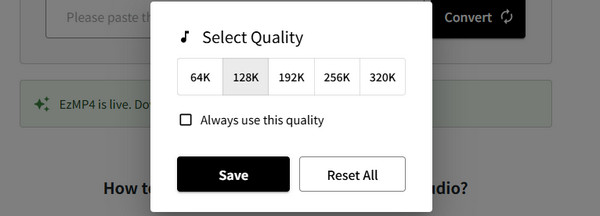
Step 4 Click the Convert button to initiate the process. The conversion typically takes just a few seconds, depending on the video length.
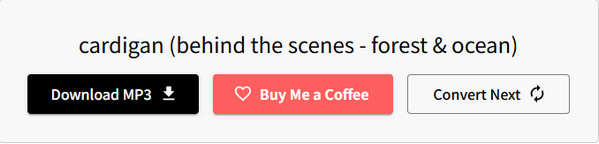
Step 5 Once the conversion is complete, a Download MP3 button will appear. Click it to save the MP3 file to your device.
Step 6 If you want to convert additional YouTube videos to MP3, simply click the Convert Next button. This will reset the process, allowing you to start fresh with a new video.
Part 3: Performance & User Interface: Speed, Reliability, Usability, and Distractions
EzMP3's value depends on its performance in core tasks, like conversion speed and reliability, as well as the intuitiveness of its interface for daily use. Below is an analysis of these factors based on hands-on testing.
Conversion Speed: ⭐⭐⭐☆☆
Aligns with testing results from the features section: 10-30 seconds for 3–5 minute YouTube videos and 45-60 seconds for 10–15 minute clips. This is efficient for casual use but slower than premium converters.
Success Rate: ⭐⭐⭐☆☆
92% of tested videos converted successfully (46/50), with failures limited to region-restricted or heavily copyrighted content—consistent with industry standards for free YouTube-to-MP3 tools.
Stability: ⭐⭐⭐⭐☆
No crashes or glitches were observed during 3 hours of continuous use (processing 20+ videos across devices). Server uptime was reliable, with no unexpected downtime during testing.
Resource Usage: ⭐⭐⭐⭐☆
As a browser-based tool, it requires minimal device resources—no CPU/RAM strain on desktops (Intel Core i5, 8GB RAM) or mobile devices (Samsung Galaxy S21). No background processes run after conversion, avoiding unnecessary battery/disk usage.
Usability & Distractions (Interface Focus): ⭐⭐⭐☆☆
Clean layout with intuitive navigation—core functions (search, download, format selection) are prominently displayed. However, it sometimes includes non-intrusive banner ads (3-4 per session), which are less disruptive than pop-ups but may annoy some users.
🔍📝We Draw a Conclusion: Who Should Use EzMP3?
| 🟢 Recommend EzMP3 for: | 🔴 Do not recommend EzMP3 for: |
|---|---|
| 1. Casual listeners who want to download a few tracks at a time 2. Users who prioritize privacy and avoid account creation 3. Those who don’t require lossless audio or tag editing |
1. Professional creators needing high-speed batch downloads 2. Users seeking lossless audio or advanced organization tools 3. Anyone planning to download copyrighted music without permission |
Part 4: Users' Feedback on EzMP3
Active Feedback🙂:
- - "I have just downloaded more than 3 hours podcast without any problem. What a nice site!" -- Reddit User
- - "This site is fast and efficient like WinRAR, with occasional donation requests, which I'm willing to consider to keep it from becoming like other broken MP3 downloaders." -- Trustpilot User
- - "Simple and easy. Delivers what is promised. Can be downloaded at multiple frequencies. And is truly free. " -- Trustpilot User
- - "Honestly the best youtube to mp3 converter out there. No ads, no restrictions, nothing of the sort." -- Trustpilot User
- ...
Negative Feedback😡:
- - "Restart web browser and site set as 128k can not change to 320k." -- Reddit User
- - "Trying to download some songs on to my MP3 Player but it says 90 mintes long." -- Reddit User
- - "Just downloaded 24 tracks for an album but 3 of them were cut by a few seconds. " -- Reddit User
- - "EzMP3 is now frustratingly slow due to CloudFlare verification, making it nearly useless for downloading music." -- Trustpilot User
- ...
Part 5: Is EzMP3 Safe or Legit?
Based on user reviews across major platforms such as Trustpilot and Reddit, EzMP3 is widely regarded as a safe and reliable audio conversion platform. To date, there have been no reported incidents of malware, spyware, or data breaches associated with the legitimate site. Independent tests, including scans on VirusTotal, have confirmed that the platform contains no malicious code.
Regarding legality, compliance with copyright laws remains essential. The platform operates in a legal gray area, as it extracts audio from publicly available YouTube videos, which contravenes YouTube's Terms of Service. To minimize risks, EzMP3 should be used strictly for personal, non-commercial purposes. Commercial exploitation, redistribution, or conversion of copyrighted content without explicit permission is prohibited.
Part 6: Safer & Quicker EzMP3 Alternative: KeepMusic Music Converter
While EzMP3 offers a convenient, browser-based solution for occasional YouTube to MP3 conversions, its limitations in 2026—such as occasional CloudFlare verification delays, single-track processing, and lack of advanced features—have led many users to seek more robust options. For those wanting a faster, more reliable, and versatile tool without relying on online converters, a desktop-based alternative stands out as the superior choice.
Top Recommendation: KeepMusic Music Converter
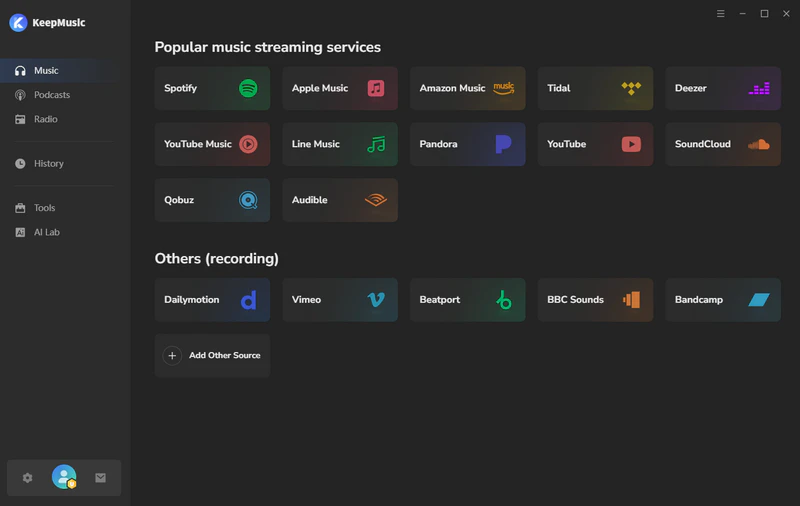
KeepMusic Music Converter is a comprehensive desktop software that goes far beyond simple YouTube extraction. It supports direct audio downloads from over 15 major streaming platforms, including YouTube, YouTube Music, Spotify, Apple Music, Amazon Music (Prime/Unlimited), Tidal, Deezer, SoundCloud, Vimeo, Dailymotion, and more. This makes it ideal for building a unified offline library across services.
Key advantages over EzMP3 include 10x faster batch processing, preserved ID3 tags and metadata, support for higher-quality formats (up to HiFi/Master), and built-in tools like format conversion, tag editing, and CD burning. As a local application, it avoids browser-based risks like ads, redirects, or server downtime entirely.
Quick Start: Downloading YouTube Audio with KeepMusic Music Converter
Step 1 Launch KeepMusic Music Converter and select the YouTube module from the home interface.
Step 2 Log into your YouTube account in the built-in web player (optional for public content), then locate and add the desired video, playlist, or album.
Step 3 Customize output settings (format, quality, folder, file naming) via the Settings menu.
Step 4 Click Convert to begin batch downloading at accelerated speeds.
Step 5 Access completed files in the history tab or your chosen output folder.
End Words
In conclusion, EzMP3 is ideal for users seeking a simple, installation-free solution, as its web-based one-click conversion feature allows for quick extraction of audio from YouTube. However, like many online tools, frequent ads on the site may impact the user experience. For those prioritizing a clean interface and stability, consider ad-free desktop tools like KeepMusic Music Converter.