


 Home > Articles > Get Spotify Unblocked for School
How to Get Spotify Unblocked for School or Anywhere

Unable to access Spotify at school or on a restricted network? This is a common issue many Spotify users encounter, such as being unable to load pages or log in. But don‘t worry, this guide will provide 6 effective methods to help you get Spotify unblocked for school or anywhere, so you can enjoy your favorite music without restrictions.
- Why is Spotify Blocked at School or Other Places?
- Method 1: Get Spotify Unblocked Using KeepMusic Music Converter (Safest & Permanent Solution)
- Method 2: Get Spotify Unblocked Website via the Spotify Web Player
- Method 3: Get Unblocked Spotify Using Mobile Hotspot
- Method 4: Get Spotify Unblocked for School with VPN
- Method 5: Unblock Spotify by Changing DNS Settings
- Method 6: Get Spotify Login Unblocked Using a Proxy Server
- Which is the Best Way to Unblock Spotify on School ChromeBook?
- FAQs about Getting Spotify Unblocked
Why is Spotify Blocked at School or Other Places?
Spotify is often blocked at schools or other public networks for several common reasons:
Regional Licensing Restrictions: Sometimes Spotify content is not available in certain regions because of licensing rules, so access may be limited depending on where you are or which network you’re using.
Bandwidth Saving: Music streaming consumes significant internet data, and schools may restrict high-bandwidth services to ensure stable network performance for educational use.
Productivity Control: Many schools and workplaces block entertainment platforms such as Spotify, YouTube, and SoundCloud to reduce distractions and encourage productivity during study or work hours.
Method 1: Get Spotify Unblocked Using KeepMusic Music Converter
Among all available methods, using KeepMusic Music Converter to download Spotify music as local files is the safest and most permanent way to get Spotify unblocked anywhere.
Unlike methods such as VPNs or proxies that rely on network access, KeepMusic allows you to download and convert Spotify songs, albums, and playlists to MP3 and other formats, and save them directly to your local device. This means you can enjoy your music offline without relying on an internet connection, completely removing dependence on school networks or other restricted environments.
Furthermore, since the music is stored locally, you are not affected by network speeds, connection stability, or server limitations during playback, thereby ensuring a smoother and more stable listening experience. Additionally, local files can be freely imported to various devices, offering greater flexibility and convenience.
KeepMusic Music Converter
How to Get Spotify Unblocked Using KeepMusic Music Converter?
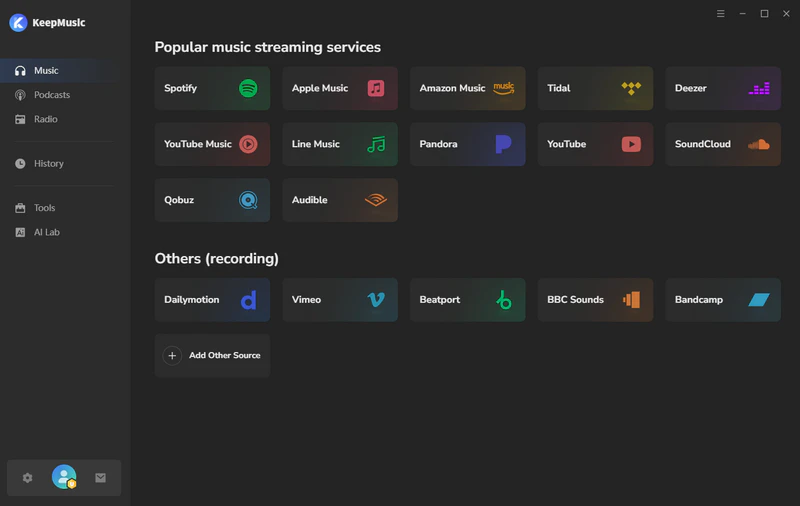
Step 1 Open KeepMusic on your computer and select Spotify from the list of supported platforms.
Step 2 Find the songs, albums, or playlists you want to save and click the "+" button to add them to KeepMusic.
Step 3 Go to settings, select the output format(MP3/AAC/WAV/FLAC/AIFF/ALAC) you prefer, and the output folder. You can also customize output filename like title, year, artist, album, ect.
Step 4 Click the "Convert" button, and KeepMusic will start batch downloading your selected music at up to 10× faster speed.
Step 5 After the download is complete, go to the "History" section to view your downloaded Spotify files.
Now, you can transfer your downloaded Spotify music to any device for offline playback, completely free from school or network restrictions.
Method 2: Get Spotify Unblocked Website via the Spotify Web Player
In many schools or public Wi-Fi environments, network restrictions are typically tiered: some restrict application access while still allowing web pages to load, while others directly block the Spotify domain. Therefore, it is necessary to select the appropriate unblocking method based on the specific network environment.
If you're looking for a quick and easy solution to try first, before turning to more advanced tools like VPNs or proxies, the most practical option is to use the Spotify Web Player. This method is very simple and requires nothing more than a web browser.
How to Get Spotify unblocked Website via the Spotify Web Player?
Step 1 Open a browser on your mobile phone or computer.
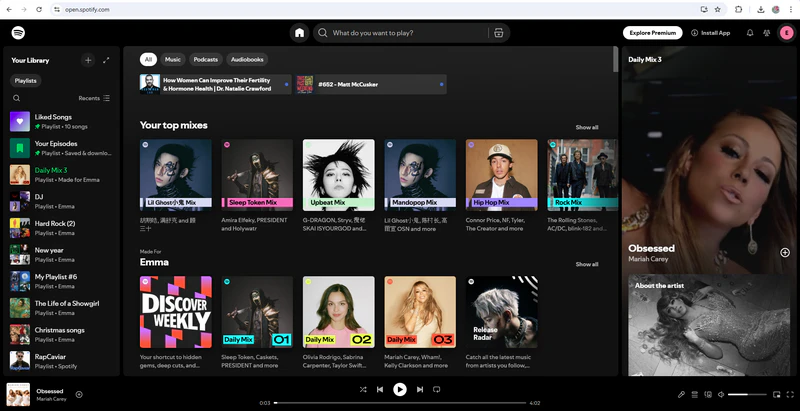
Step 2 Go to the unblocked Spotify web player page(https://open.spotify.com).
Step 3 Log in to your Spotify account and play the music you want to listen to.
Method 3: Get Unblocked Spotify Using Mobile Hotspot
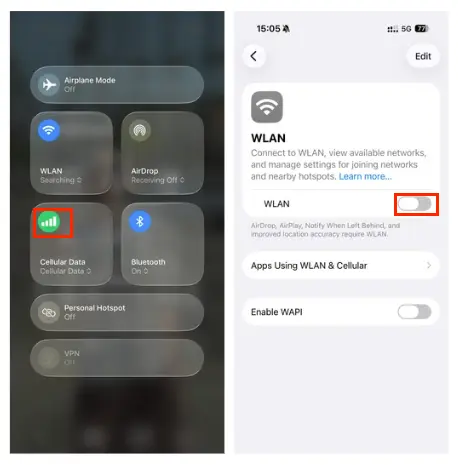
If the school Wi-Fi completely blocks Spotify, using mobile data or a mobile hotspot is the simplest way to unblock Spotify. By utilizing the mobile data network on the phone instead of the school's Wi-Fi, it bypasses network restrictions, thereby enabling the device to access Spotify normally. This method is simple; however, playing music consumes a significant amount of mobile data, so it is recommended that you monitor your data usage.
How to Get Unblocked Spotify Using Mobile Data/Hotspot?
Using Mobile Data on Phone
Step 1 Go to your phone settings, turn off Wi-Fi, and turn on mobile data.
Step 2 Open the Spotify app, log in to your account, and start playing music.
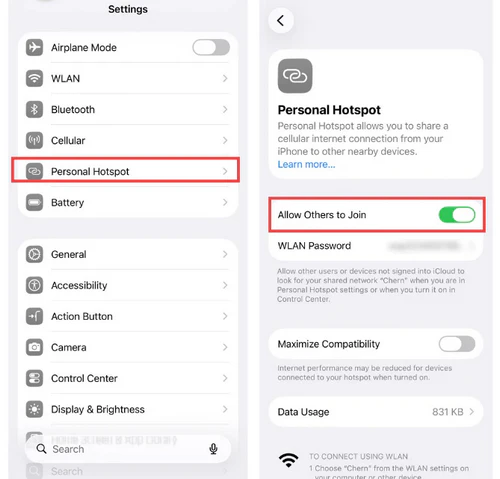
Using Mobile Hotspot on Computer
Step 1 Enable the "Personal Hotspot" feature and set the network password. (Make sure you have turned on mobile data)
Step 2 On your computer, open the Wi-Fi settings and connect to your mobile hotspot network.
Step 3 Once successfully connected, launch the Spotify app or Spotify Web Player to use it normally.
Method 4: Get Spotify Unblocked for School with VPN
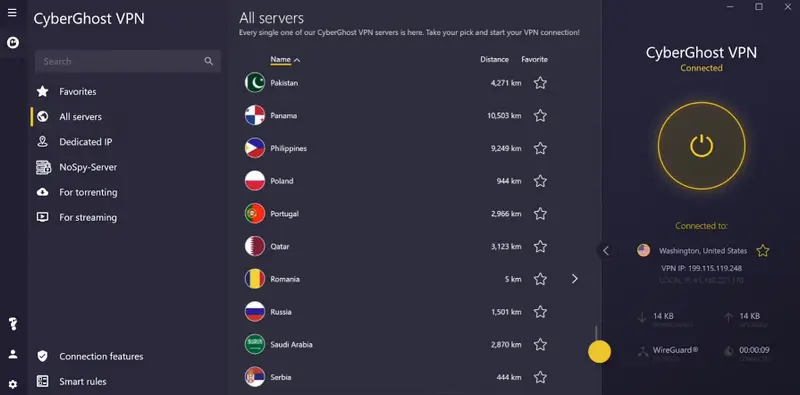
Using a VPN (Virtual Private Network) is one of the common methods for bypassing school or public network restrictions to access Spotify. It works by masking your real IP address and routing your network connection through a server in a country or region of your choice, thereby allowing you to access Spotify where it is available. For better stability and performance, it is recommended to use reliable VPN providers such as NordVPN or ExpressVPN.
How to Get Spotify Unblocked for School with VPN?
Step 1 Choose a reliable VPN provider and install it on your device (phone, tablet, or computer).
Step 2 Open the VPN and connect to a server in a country where Spotify is available.
Step 3 Once connected, launch Spotify and access music without network restrictions.
Method 5: Unblock Spotify by Changing DNS Settings
DNS (Domain Name System) is responsible for translating website addresses into IP addresses. School or public networks may block Spotify at the DNS level, resulting in restricted access or failure to load the service. In such cases, modifying your DNS settings and switching to a public DNS server can sometimes restore access to Spotify.
How to Unblock Spotify by Changing DNS Settings?
On iPhone
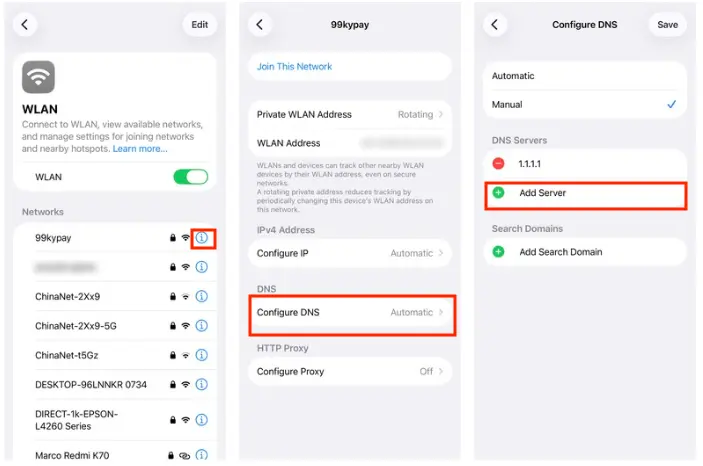
Step 1 Open Settings, go to Wi-Fi, and tap the "i" icon to the right of the network you are connected to.
Step 2 Select "Configure DNS" and change it to "Manual".
Step 3 Click "Add Service," enter the Public DNS, and then click "Save."
Public DNS Servers: Google DNS (8.8.8.8, 8.8.4.4) / Cloudflare DNS (1.1.1.1, 1.0.0.1)
On Android
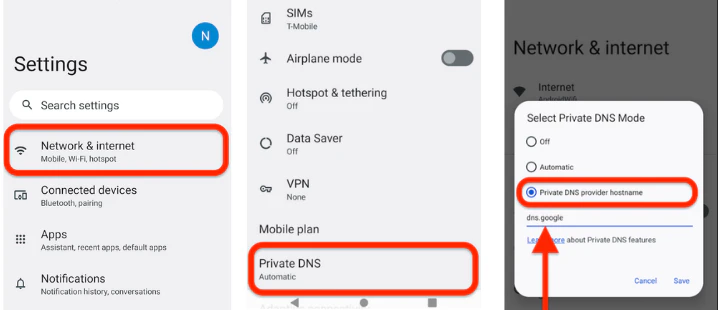
Step 1 Open Settings and go to Network & Internet.
Step 2 Find Private DNS, and select Private DNS provider hostname.
Step 3 Enter the DNS you wish to use: dns.google (Google) / one.one.one.one (Cloudflare)
On Computer(Windows)
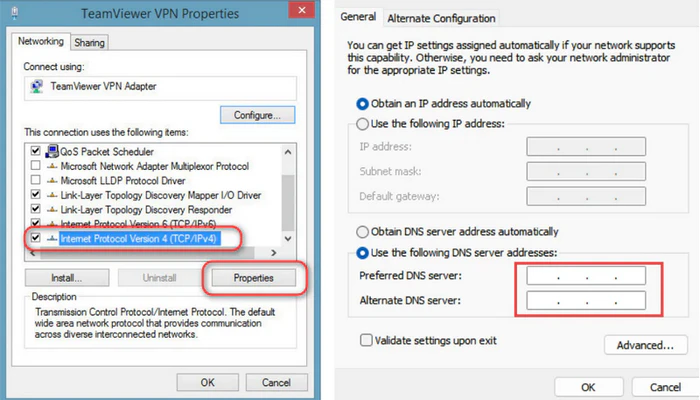
Step 1 Open the Control Panel, go to Network and Internet, and find the Network and Sharing Center.
Step 2 Click on the current network connection and select "Properties"
Step 3 Locate "Internet Protocol Version 4 (TCP/IPv4)," click Properties again, and manually enter the DNS server address.
Method 6: Get Spotify Login Unblocked Using a Proxy Server
A proxy server acts as an intermediary between a user and a website. When using a proxy, your real IP address is hidden, and Spotify identifies the location of the proxy server rather than your school network. This can help bypass network restrictions to a certain extent and allow you to access Spotify.
For manual proxy configuration (IP + Port), it is recommended to use professional proxy service providers. Common options include Webshare, Decodo (formerly Smartproxy), Oxylabs, and IPRoyal.
How to Get Spotify Login Unblocked Using a Proxy Server?
On Spotify App
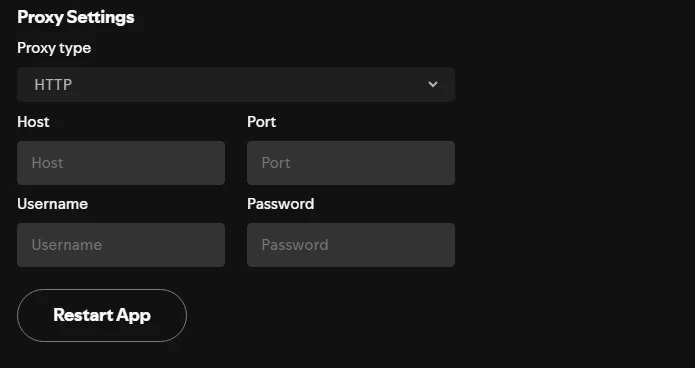
Step 1 Open the Spotify app, tap your profile, and go to Settings.
Step 2 Scroll down to find Proxy Settings, select HTTP, and enter the proxy details.
Step 3 Click the "Restart App" button to restore Spotify access.
On Computer
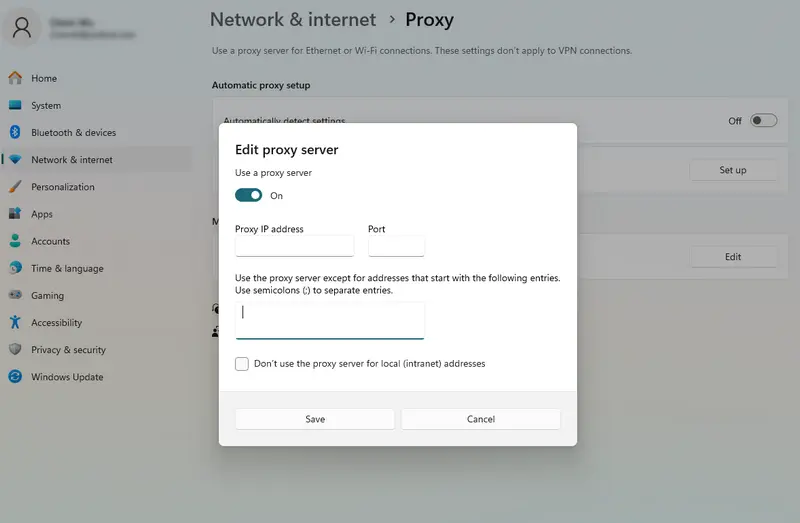
Step 1 Open System Settings, then go to Network & Internet.
Step 2 Locate the Proxy settings, and manually enter the proxy server address and port.
Which Is the Best Way to Unblock Spotify on School ChromeBook?
School Chromebooks often come with strict restrictions that limit access to streaming services like Spotify. Because these controls vary depending on the school’s policy, different methods may work in different situations. The effectiveness of each option usually depends on whether the goal is quick access, stable streaming, or offline listening without network restrictions.
| Method | Works Offline | Stability | Best For |
|---|---|---|---|
| KeepMusic Music Converter | ✅ | ⭐⭐⭐⭐⭐ | Long-term use, permanent solution |
| Spotify Web Player | ❌ | ⭐⭐⭐ | Quick access if not fully blocked |
| Mobile Hotspot | ❌ | ⭐⭐⭐⭐ | Who has sufficient data usage |
| VPN | ❌ | ⭐⭐⭐ | Temporary access, moderate restrictions |
| DNS Settings | ❌ | ⭐⭐⭐ | Light network restrictions |
| Proxy Server | ❌ | ⭐⭐⭐ | Basic or temporary access |
Final Recommendation:
- 🥇Best overall solution: KeepMusic Music Converter
- 🥈Best quick solution: Spotify Web Player
- 🥉Most direct workaround: Mobile Hotspot
- ⚠️Less reliable method: VPN, DNS, Proxy
Among all available methods, offline listening is generally the most consistent approach because it does not depend on school network rules or real-time access to Spotify. Once downloaded, music files can be played anytime as local audio, making this approach especially practical for school Chromebook environments.This is why an offline listening solution (Method 1) is widely considered the safest and most effective choice—it allows you to enjoy your music as local files, completely bypassing the need for a real-time connection to Spotify's servers and school monitoring software.
FAQs about Getting Spotify Unblocked
1. Is It Legal to Unblock Spotify at School?
It depends on the school's network usage regulations. While Spotify itself is a legal service, bypassing school network restrictions to access it may violate school rules or network policies; therefore, please always comply with the relevant regulations established by the school.
2. How to Get Spotify Free Music Unblocked at School without VPN?
In the absence of a VPN, the best method is to use KeepMusic Music Converter to access Spotify. It allows you to download and convert Spotify tracks into local audio files. Once saved to your device, these files can be played offline without relying on your school network or a VPN. This method is stable, safe, and provides a long-term solution for listening to music in restricted network environments.
Summary
When you are unable to access Spotify normally, there are various methods you can use to bypass these restrictions—such as utilizing the Web Player, a mobile hotspot, a VPN, DNS modification, or a proxy server. While these methods can provide temporary access in different scenarios, their stability and reliability are limited over time.
In contrast, using KeepMusic Music Converter to download Spotify music as local files enables offline playback that is independent of your network environment, offering a more stable and permanent solution.