


5 Best Free YouTube Downloaders Android in 2026 (Tested for Speed & Audio Quality)
 By Ada Staples
- Updated on: September 22, 2026
- Category: YouTube Music Tips
Finding a reliable YouTube download tool for Android devices is no easy task. In this guide, we tested 5 popular free Android YouTube downloaders and evaluated their performance in various aspects. Please continue reading to find out which tools are the best for you.
1. How We Tested These Android YouTube Downloaders?
To ensure the comparisons were as consistent as possible, we used the same Android device and the same internet connection for all 5 YouTube downloaders Android.
We tested each download tool using the same two sets of content:
- Single track test: a song lasting 3 minutes and 47 seconds
- Album test: an album containing 21 tracks with a total duration of 1 hour and 18 minutes
We examined the following aspects:
- Download speed (for individual songs & albums)
- Download success rate and failure rate
- Supported audio formats
- Actual bitrate of downloaded files
- Retention of ID3 metadata
- Advertisements and pop-ups
- Playlist/Album parsing capability
2. Quick Comparison: 5 Best YouTube Downloaders for Android
The table below summarizes the main differences among these 5 Android YouTube Music downloaders, helping you quickly compare various functions and limitations.
| Tool | Platform | Output Formats | Single Track | Album Download | Actual Bitrate | ID3 Tags | Ads |
| YTDown.com | Online tool | M4A, MP3 | 10s | No | ~185kbps | ❌ | None |
| Y2Mate | Online tool | MP3 | 11s | No | ~128kbps | ✅ | Pop-ups |
| SnapTube | Android app | M4A, MP3 | 5s | 5.5 min | 320kbps | ✅ | Yes |
| YTDLnis | Open-source Android app | MP3, M4A, AAC, ALAC, FLAC, OPUS, WAV, Vorbis | 30s | 15 min | ~132kbps | ✅ | None |
| Seal | Open-source Android app | OPUS, M4A, MP3 | 5s | 13 min | ~128kbps | ✅ | None |
These Android downloaders are suitable for users who want a quick way to save YouTube music on their phones. However, if you prefer higher-quality audio, better file organization, and a more reliable workflow, KeepMusic YouTube Music Converter offers an alternative desktop solution.
 Free Download
Trusted by 100,000+ users
 Free Download
Free Trial Available
3. Top 5 Best Free YouTube Downloader Android Tools (Real Test Results)
We conducted tests on 5 popular YouTube Downloader Android tools under the same conditions, focusing on comparing download speed, audio quality, metadata retention, and advertising situations.
3.1 YTDown.com
Website: https://app.ytdown.to/en38/
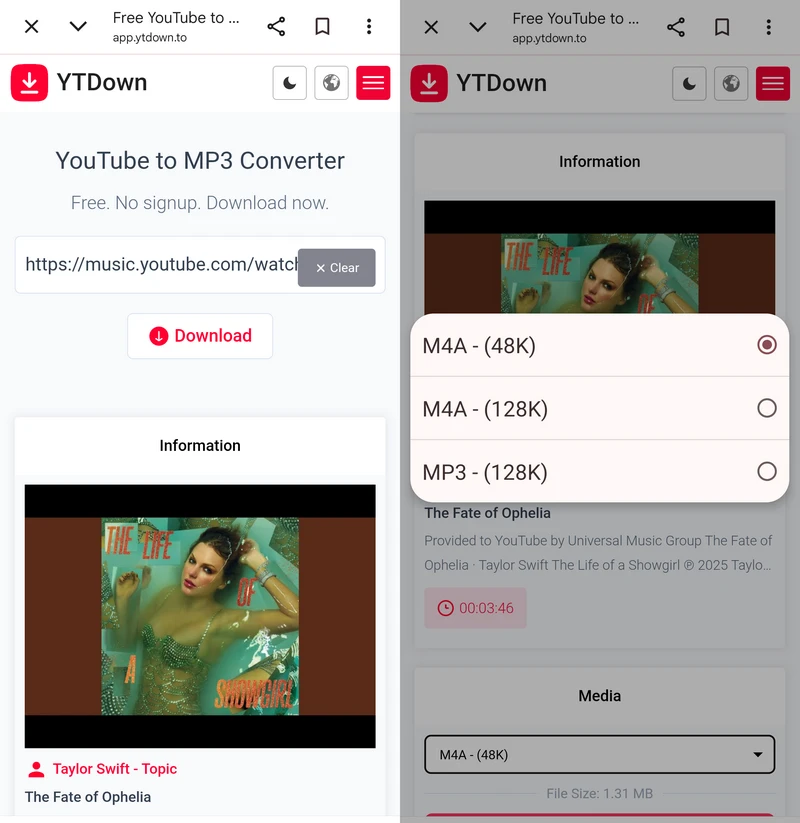
YTDown.com is a free online YouTube downloader designed specifically to allow users to quickly download YouTube music without having to install an Android app.
During testing, it downloaded a 3-minute-47-second song in just about 10 seconds, making it one of the faster downloaders for single-track downloads. It does not support playlists or albums, and will directly prompt "Missing or Invalid YouTube URL". Additionally, no advertisements appeared throughout the download process.
In terms of audio quality, it offers both M4A and MP3 formats. While the MP3 is specified as 128 kbps, our tests showed the downloaded files to be 185 kbps. However, it does not retain ID3 tags, which is a significant drawback for users who need to organize their music libraries.
- Fast processing speed for individual tracks (10 seconds).
- Completely ad-free with no pop-ups Android YouTube downloader.
- No need to install an app or APK on Android.
- Supports M4A and MP3 formats.
- Cannot parse or download playlists/albums.
- Cannot embed metadata (ID3 tags, track names, or album art).
- Limited audio format options; MP3 quality capped at 128 kbps.
3.2 Y2Mate
Website: https://en.y2mate.sx/v11/
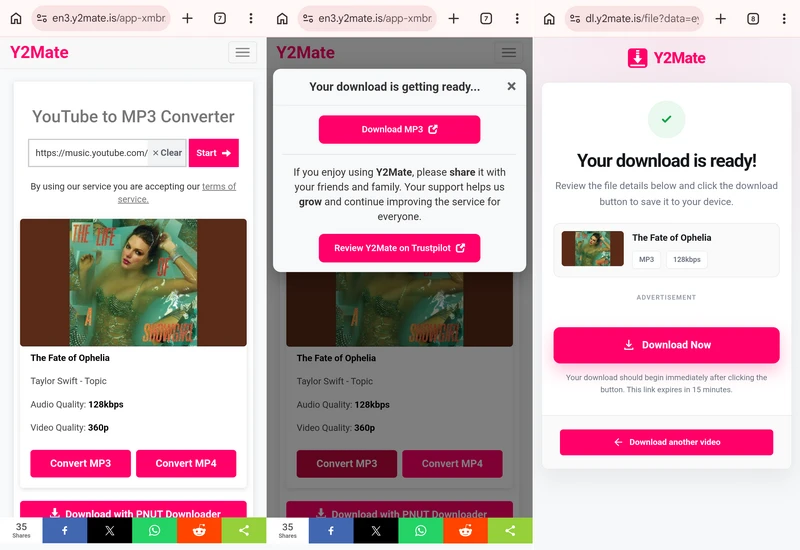
Y2Mate is one of the most popular online YouTube to MP3 downloader for Android users looking to save YouTube music as MP3 audio directly.
In our tests, it took approximately 11 seconds to download the same song, matching the performance of YTDown.com for single-track processing. One of its advantages is that it retains ID3 tags during the test, meaning the downloaded MP3 files retain basic music metadata.
Although the conversion speed is fast, an advert page pops up when the download begins, making the whole process less secure than other ad-free YouTube downloaders for Android. Additionally, its output quality limit is 128kbps, and it does not support album or playlist links. Therefore, it is more suitable as a dedicated tool for simple, single-track MP3 downloads.
- Fast YouTube to MP3 Download speed (11 seconds per song).
- Preserves full ID3 tags and original album art.
- Convenient for Android mobile use; no installation needed.
- Multiple Y2Mate domains make it difficult to identify the official website.
- Actual download bitrate is around MP3 128 kbps.
- Pop-up pages appear during the download process.
- Does not support downloading playlists or albums.
3.3 Snaptube
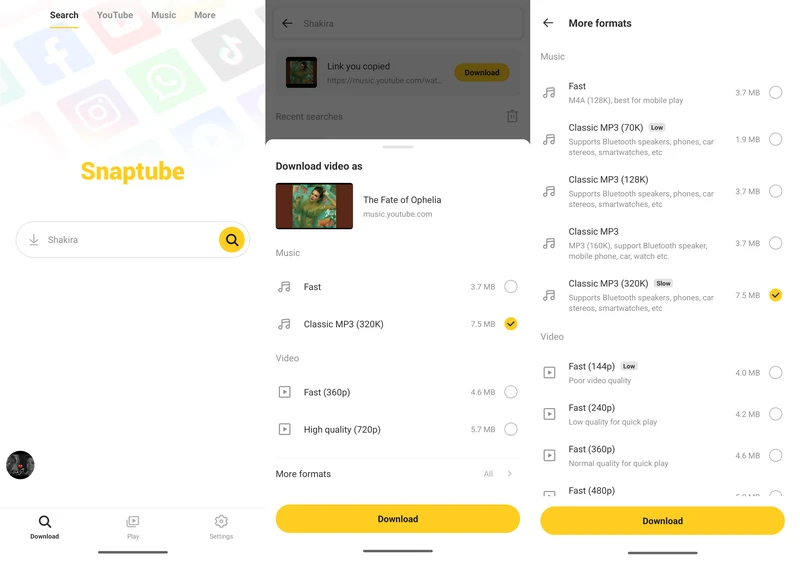
Snaptube is a highly popular Android video downloader, emphasizing speed and simplicity. In our tests, it was one of the fastest among the five YouTube downloaders Android. Downloading the same song only took approximately 5 seconds. When downloading the same album containing 21 songs, the entire process took only about 5 minutes and 30 seconds. Moreover, it supports multi-task downloading, and in the test, up to 10 download tasks could be carried out simultaneously.
SnapTube supports M4A and MP3 output, with an MP3 option of up to 320kbps. The main downside is its advertising experience, including a waiting ad when opening the app, additional ads during downloads, and occasional Play Store redirects.
👉 Note: SnapTube's 320kbps option refers to the output MP3 bitrate, not the original YouTube Music source quality. Since YouTube Music typically provides audio quality up to 256kbps AAC, converting it to 320kbps MP3 does not add extra audio details.
- Fast album processing speed (5.5 minutes, 100% success rate).
- Supports up to 10 simultaneous YouTube music downloads.
- Provides MP4/MP3 content from its own library.
- Supports M4A and MP3 formats and automatic lyric downloading.
- Some users may have privacy and security concerns.
- Displays a 20-second advertisement upon opening the app.
- Shows additional ads during downloads.
3.4 YTDLnis
Website: https://github.com/Cat-Ling/ytdlnis
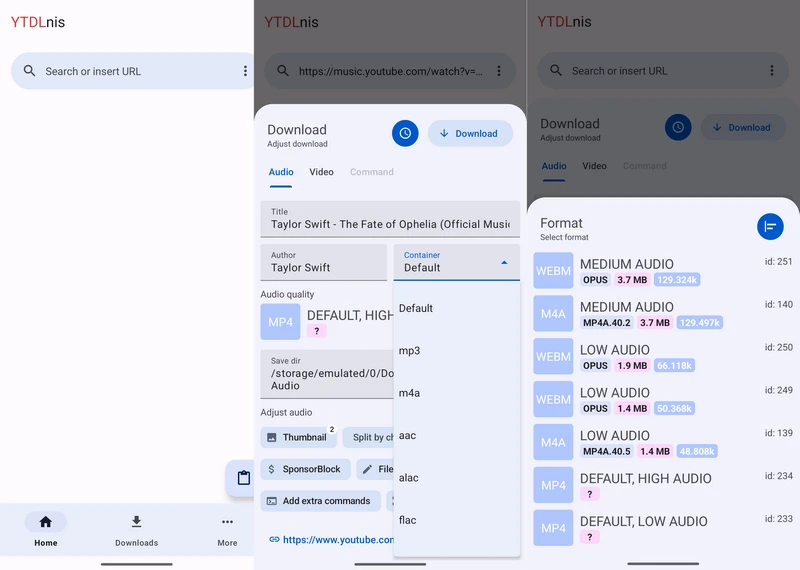
YTDLnis is a free and open-source Android YouTube Downloader on GitHub. It is built based on yt-dlp and features a simple graphical user interface (GUI) while being updated frequently.
Under the same testing conditions, YTDLnis takes approximately 30 seconds to download a single song. When processing an album containing 21 songs (with a total duration of 1 hour and 18 minutes), it takes about 15 minutes. Among them, 2 songs failed to download but were automatically skipped, so the download process was not halted.
One point to note during the test is that when pasting the single song link from YouTube Music, YTDLnis sometimes matches the link to the standard YouTube video version (such as the official MV), rather than the official audio stream. This is because YTDLnis relies on yt-dlp, and yt-dlp does not have complete support for music.youtube.com.
- Free, open-source, and completely ad-free YouTube Downloader for Android.
- Supports 8 audio formats (MP3, M4A, AAC, ALAC, FLAC, OPUS, WAV, Vorbis), making it suitable for users with specific format requirements.
- Preserves and embeds full ID3 tags and metadata.
- Slow download speed for individual tracks.
- Best quality option still produced low average bitrate (132kbps).
- YouTube Music track links may be prased as YouTube video versions.
3.5 Seal
Website: https://github.com/JunkFood02/Seal
Seal is a popular open-source YouTube Downloader for Android built on the yt-dlp engine. In our tests, it combined high download speeds with a clean, ad-free user experience.
It takes only about 5 seconds to download a single song, with download speeds comparable to those of SnapTube. In the 21-song album test, Seal took 13 minutes to complete all the tracks and maintained a 100% perfect success rate. Its stability was better than that of YTDLnis.
When downloading the APK from GitHub, the Android browser displayed a warning saying "File might be harmful". This does not necessarily mean that the application is unsafe, but users should definitely verify that the APK comes from the official GitHub release page.
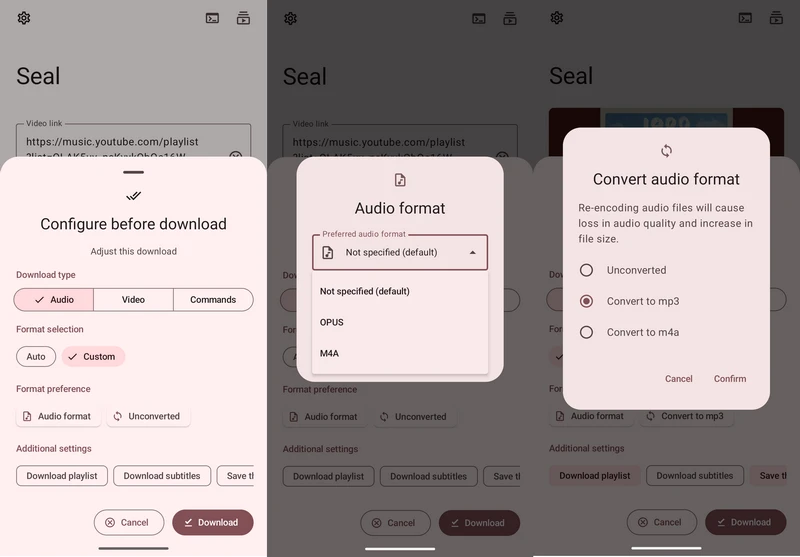
- A GitHub YouTube downloader developed using yt-dlp.
- Takes only 5 seconds to process a single song.
- Ad-free during the downloading process.
- Supports saving subtitles and thumbnails.
- MP3 output format must be enabled manually.
- Output MP3 bitrate is relatively low (128 kbps).
- YouTube Music single-track links may resolve to MV/video versions (same yt-dlp limitation as YTDLnis).
4. Best Desktop Choice for Music Download: KeepMusic YouTube Music Converter
After testing 5 Android YouTube downloaders, we found that although the mobile tools are convenient for quick downloads, they also have limitations. However, if you are seeking a more reliable YouTube Music download and high-quality audio experience, using the desktop tool would be a better choice.
KeepMusic YouTube Music Converter is a desktop application compatible with Windows and Mac platforms, specifically designed for downloading and converting YouTube Music content.
Free Download
Trusted by 100,000+ users
Free Download
Free Trial Available
Real Test Performance & Experience
- Single track: About 25 seconds
- Album (21 songs): About 13 minutes
- Album success rate: 100%, no failed tracks
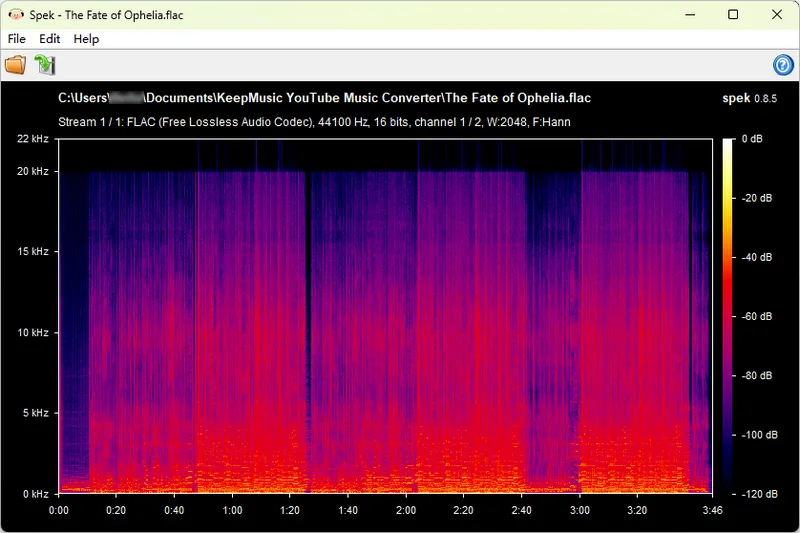
- Audio quality: Verified with Spek, showing a high-quality frequency range without obvious signs of a low-bitrate source
- Metadata: Full ID3 tags and metadata preserved
- Ads:No ads
Although it is not the fastest tool in terms of single-track download speed in the tests, its advantages do not lie solely in the download speed. Compared with many Android download tools, KeepMusic places more emphasis on high audio quality, metadata preservation, and long-term stable music download experience.
Comparison Table: KeepMusic vs. YouTube Downloader Android
| Feature | KeepMusic YouTube Music Converter | YouTube Music Downloader Android |
| Platform | Desktop (Windows & Mac) | Android APK & App or mobile browser |
| Single Track Download (3:47) | 25s | 5s-30s |
| Album Download (21 Songs) | 13 mins (100% Success Rate) | 5.5-15 min; some tools fail 1-2 tracks |
| Audio Quality | ✅ High-quality output verified with Spek | Often 122-132kbps actual bitrate |
| Metadata Preservation | ✅ Full ID3 tags and music information preserved | Depends on the downloader |
| Ads / Pop-ups | ✅ No ads | Some tools may contain ads or redirects |
| Audio Source | YouTube Music content with dedicated music download workflow | Some tools may resolve YouTube Music links to standard YouTube video audio |
| Best For | Users who desire high-quality audio, stable batch downloads, complete metadata, and an ad-free experience | Users who want to quickly download individual songs or a small number of songs directly on Android |
Free Download
Trusted by 100,000+ users
Free Download
Free Trial Available
FAQ About YouTube Downloader for Android
1. How can I download YouTube Music directly to my Android?
You can download YouTube Music content in two ways. Android users can use mobile downloaders such as YTDLnis, Seal, or SnapTube to save songs directly to their devices. Alternatively, you can use a desktop converter like KeepMusic YouTube Music Converter to download higher-quality audio on Windows or Mac first, then transfer the downloaded files to your Android phone for better music management.
Read More: How to Download YouTube Music to USB Flash Drive?
2. How to download YouTube APK for Android?
You can download the YouTube-related APK files from trusted sources such as the official website or the official release page of the developer on GitHub. When installing the APK on platforms other than Google Play, the Android system may display a security warning. Please make sure to confirm the source of the APK before installation.
Read More: Is YouTube Music ReVanced Safe and Legal? Everything You Need to Know
3. What is the best YouTube music downloader app for Android?
If you are looking for the fastest download speed and the highest audio quality, Snaptube is the best YouTube Music downloader Android, but it includes advertisements.
If you want to download playlists and albums, you can choose Seal and YTDLnis. They are free and open-source YouTube downloader APK for Android (available on GitHub).
Summary
The best YouTube downloader for Android depends on your specific needs. Consider whether you prioritize download speed, audio quality, playlist support, or overall stability. If you are looking for superior audio quality, full metadata retention, reliable batch downloading, and an ad-free experience, a desktop application like KeepMusic Music Converter might be the ideal choice.
Free Download
Trusted by 100,000+ users
Free Download
Free Trial Available