


YouTube MP3 Downloader GitHub: 3 Free Projects & An Easier Alternative
 By Ada Staples
- Updated on: August 28, 2026
- Category: YouTube Music Tips
Do you want to find a YouTube MP3 downloader on GitHub to save your favorite videos or music? This article will introduce the top 3 free open-source YouTube downloaders on GitHub and analyze their respective applicable scenarios. If you are looking for a convenient solution that requires no complex setup, KeepMusic YouTube Music Converter is also a tool worth considering. Let's read on!
1. Best YouTube MP3 Downloader: KeepMusic YouTube Music Converter
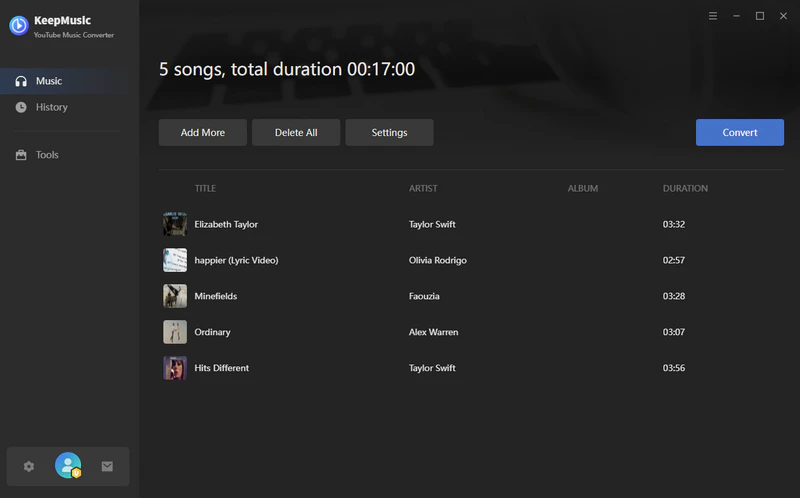
KeepMusic YouTube Music Converter is a safe, ad-free, and reliable long-term solution - an ideal choice for converting YouTube Music to MP3. Unlike many YouTube MP3 downloaders based on GitHub (which usually require using the command line or additional configuration), KeepMusic YouTube Music Converter offers an intuitive interface for downloading and converting YouTube music. It is accessible to the vast majority of users, allowing for easy conversion of YouTube to MP3 without the need for manual configuration.
 Free Download
Trusted by 100,000+ users
 Free Download
Free Trial Available
Key Features of KeepMusic YouTube Music Converter
| Feature | KeepMusic YouTube Music Converter |
| Installation | Standard desktop GUI installer |
| Compatibility | Windows 7 or later (32/64-bit) & macOS 11 and above |
| Supported Content | Songs, albums, playlists |
| Output Formats | MP3, AAC, FLAC, WAV, AIFF, ALAC |
| Audio Quality | Up to 256kbps (Original sound quality retention) |
| Batch Download | Yes |
| Playlist Download | Yes |
| Conversion Speed | Up to 10X batch speed with hardware acceleration |
| ID3 Tags | Preserves song title, artist, album, cover art, and complete metadata |
| Ease of Use | One-click download, beginner-friendly |
| Safety | 100% clean, no ads, no malware |
| Free Trial | Convert 1 minute of each song |
| Best For | Users who want a stable, long-term YouTube to MP3 converter |
How to Convert YouTube to MP3 Legally with KeepMusic?
Step 1 Install and Launch KeepMusic
Download and install KeepMusic YouTube Music Converter on your computer, and then launch the program. Its desktop interface is simple and clean, and there is no need to use the command line or manually configure the download tool.
Free Download
Trusted by 100,000+ users
Free Download
Free Trial Available
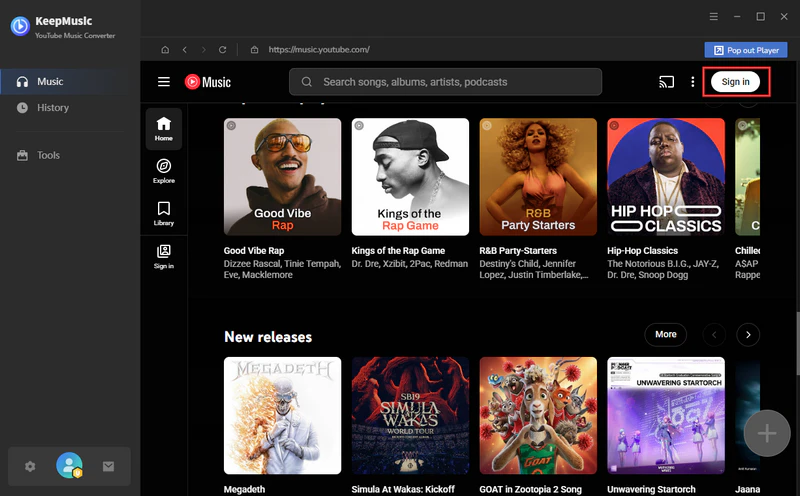
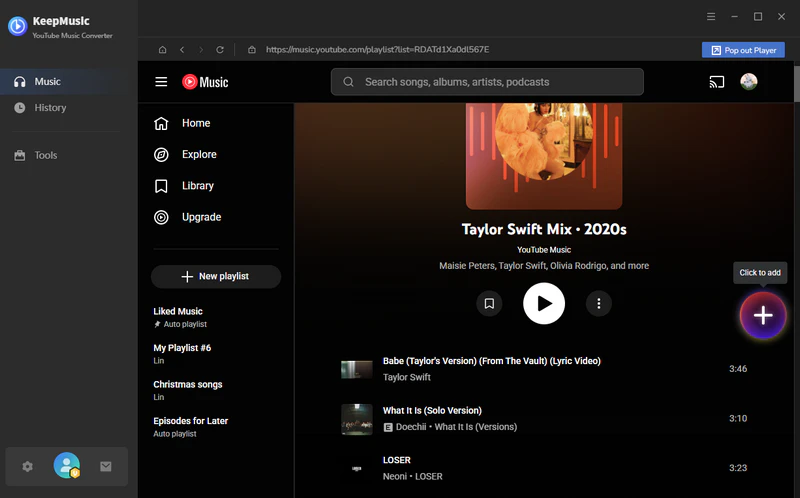
Step 2 Find and Add the YouTube Music
Find the songs, playlists, albums, or podcasts you want to download, then click the "Add" button. You can select an entire playlist for batch conversion.
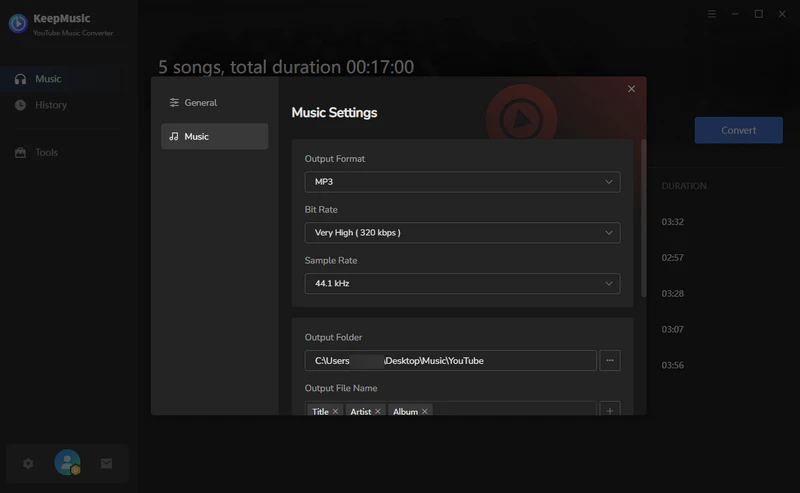
Step 3 Select MP3 as the Output Format
Go to the Settings windows and select MP3 output format and your preferred bitrate.
Step 4 Convert YouTube to MP3
Click the Convert button, and KeepMusic will download the selected YouTube Music tracks to MP3 automatically. Once completed, all MP3 files will be saved to your local computer with full ID3 tags and cover art.
2. Top 3 Free YouTube MP3 Downloader GitHub Projects
There are 3 free YouTube MP3 downloaders available on GitHub that can convert YouTube into MP3 format. They differ in the way they download and convert YouTube content.
2.1 yt-dlp - Best for Advanced Users
Website: https://github.com/yt-dlp/yt-dlp
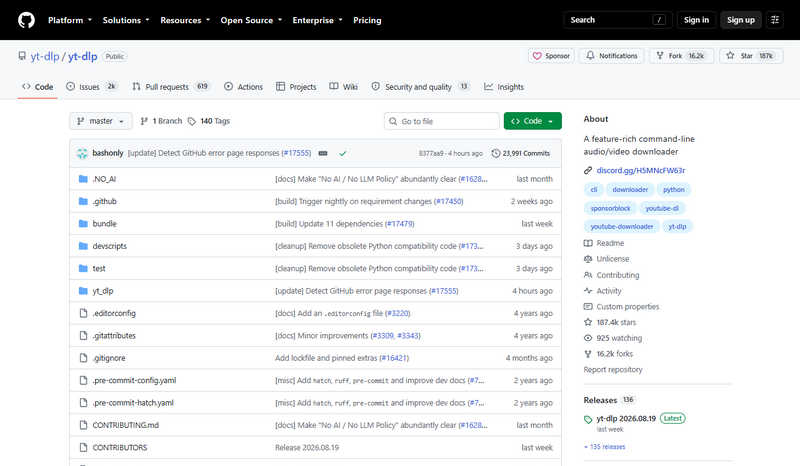
yt-dlp is a free and open-source command-line YouTube MP3 downloader on GitHub. It is highly flexible and enables users to customize the audio bitrate, download the entire playlist of a channel, and achieve automated downloads through custom scripts. Primarily aimed at developers and tech enthusiasts, yt-dlp operates via the command-line interface, making it better suited for advanced users than beginners.
- Open-source and free YouTube downloader, no paywalls or ads.
- Works on Windows, macOS, and Linux.
- Offers many customization options.
- Extract YouTube videos as MP3 or other audio formats.
- Requires command-line knowledge.
- Needs ffmpeg installed for MP3 conversion.
- No graphical interface.
Steps to Download YouTube to MP3 with yt-dlp:
- Step 1: Download the version of yt-dlp that is suitable for your system from the GitHub Releases page.
- Step 2: Download FFmpeg and add it to your system's PATH environment variable.
- Step 3: Open the Command Prompt or Terminal, then run the following command: yt-dlp -x --audio-format mp3 "YOUR_YOUTUBE_URL".
- Step 4: yt-dlp will download the audio and use FFmpeg to convert it to MP3 format.
👉 Although yt-dlp has a powerful workflow, it requires certain technical configuration. KeepMusic YouTube Music Converter offers a simpler, GUI-based operation experience, allowing you to easily convert YouTube to MP3 format.
2.2 YouTube Playlist Downloader - Best for Playlist Downloads
Website: https://github.com/shaked6540/youtubeplaylistdownloader
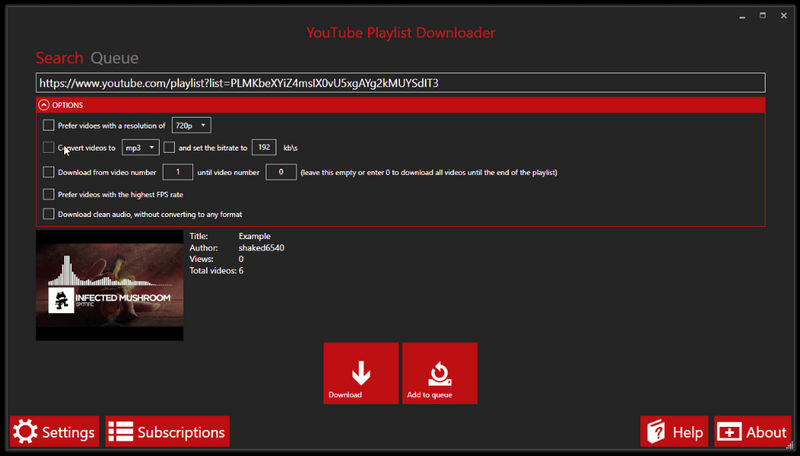
YouTube Playlist Downloader is a free, open-source desktop application built for Windows users to batch-download complete playlists, channel content, or collections of individual tracks. It boasts a clean, intuitive GUI, allowing you to easily manage large-scale download tasks without writing any code. It automatically extracts video metadata and embeds ID3 tags directly into converted MP3 files.
- Simple and easy to use with graphical interface.
- Supports downloading entire playlists or channels.
- Supports converting YouTube to various mainstream formats.
- Frequent updates and active maintenance.
- Occasional 403 errors or download failures.
- No macOS or Linux versions available.
Steps to Download YouTube to MP3 with YouTube Playlist Downloader:
- Step 1: Download the latest.exe installer from the GitHub project's Releases page.
- Step 2: Launch the YouTube MP3 downloader Github and paste the YouTube video or playlist link.
- Step 3: Select MP3 or a high-bitrate audio format.
- Step 4: Click "Download" to start the download and conversion process.
2.3 Tubly YouTube Downloader Extension - Best Browser Extension for One-Click Downloads
Website: https://github.com/tublydownloader/Youtube-Downloader-Extension
Tubly YouTube Downloader Extension is a browser-based YouTube download tool that enables you to directly download videos on the YouTube page and convert them to MP3 format with just one click. For users who prefer not to install standalone desktop software, Tubly offers a lightweight, browser-side solution. This YouTube MP3 Downloader GitHub is compatible with a wide range of major browsers, including Chrome, Edge, Firefox, Opera, Brave, and Vivaldi.
- Free web-based YouTube downloader, no additional software required.
- Supports one-click convert YouTube to 320kbps MP3.
- Supports downloading YouTube Shorts and private videos that you have access to.
- Not suitable for batch downloading of YouTube playlist at one time.
- Browser extensions may stop working due to changes on the YouTube platform.
Steps to Download YouTube to MP3 with Tubly YouTube Downloader Extension:
- Step 1: Download the extension package from GitHub and load it into the browser you are using.
- Step 2: Go to the YouTube website and play the video or Short you want to convert.
- Step 3: Click the "Download" button that appears below the video player and select the "Audio" option. Choose the MP3 format and the desired audio quality to start saving the MP3 file to your computer.
FAQ About YouTube MP3 Downloader GitHub
1. Can YouTube downloader GitHub tools download high-quality MP3s?
Yes. Some of the YouTube downloaders on GitHub support the output of high-quality MP3 files. Depending on the source file and the tool used, the audio quality can reach up to 256 kbps.
2. What is the best YouTube MP3 downloader on GitHub?
Yt-dlp is widely regarded as the best-performing YouTube MP3 downloader on GitHub due to its versatility and active community updates. However, since yt-dlp requires the use of the command line and manual configuration of FFmpeg, it has a certain technical threshold.
3. What safe, ad-free, and reliable YouTube playlist to MP3 converters are available in 2026?
KeepMusic YouTube Music Converter is one of the safest options for converting playlists to MP3 format. It is completely free of ads, malware, or bundled third-party software. With its built-in YouTube web player, it allows users to batch download entire playlists as high-quality MP3 files at 10x speed, without needing any system configuration. Compared to the free and open-source GitHub YouTube MP3 playlist downloader, KeepMusic has long-term stability and dedicated customer support.
Summary
GitHub projects such as yt-dlp, YoutubePlaylistDownloader, and Tubly YouTube Downloader Extension offer flexible, open-source methods for downloading YouTube audio, but they often require technical configuration. If you need a safer, ad-free, and user-friendly MP3 downloader, KeepMusic Music Converter remains the most reliable choice for daily use.
Free Download
Trusted by 100,000+ users
Free Download
Free Trial Available