


 Home > Articles > YouTube Music to MP3 Converter
YouTube Music to MP3 Converter App – Better Than Online Tools

Looking for an online YouTube Music to MP3 Converter? If you searched for "online YouTube Music to MP3 converter", you probably found many unreliable websites. Most online converters have these problems:
The better solution: A dedicated desktop app like KeepMusic that converts YouTube Music to MP3 with higher quality, faster speed, and no limitations.
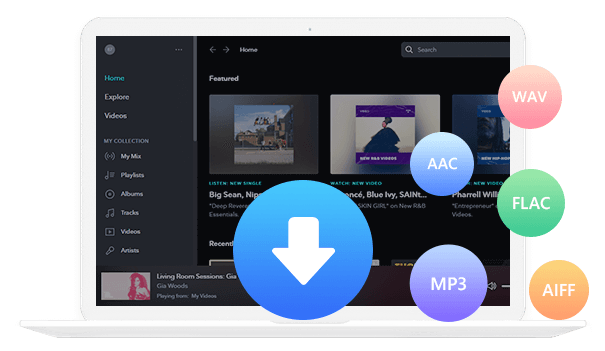
Why KeepMusic Beat Online YouTube Music Converters
Many online YouTube Music converters are unreliable, slow, or limited in functionality. KeepMusic offers a professional desktop app that outperforms online tools in every aspect, providing a fast, safe, and high-quality download experience.
With KeepMusic, you get high stability, continuous updates, 24/7 free customer support, and a completely ad-free experience. It preserves the original audio quality and metadata, ensuring your downloaded songs maintain the same quality as the originals.
KeepMusic supports all playable YouTube Music content, including songs, albums, and playlists, and offers multiple output formats such as MP3, AAC, WAV, FLAC, AIFF, and ALAC. With up to 10x conversion speed, downloading your favorite music has never been easier.
| Feature | KeepMusic App | Online YouTube Music Converters |
|---|---|---|
| Safety | ✅ High – Ad-free & secure | ❌ Often unsafe, contains ads |
| Stability | ✅ High – Reliable, continuous updates | ❌ Low – May crash or fail |
| Support | ✅ 24/7 free customer service | ❌ Usually none |
| Audio Quality | ✅ Preserves original quality and metadata | ❌ Often lossy, tags missing |
| Conversion Speed | ✅ Up to 10x faster | ❌ Limited by network and server |
| Content Supported | ✅ All playable YouTube Music content (songs, albums, playlists) | ❌ Usually single songs only |
| Output Formats | ✅ MP3, AAC, WAV, FLAC, AIFF, ALAC | ❌ Limited, often only MP3 |
| Ads | ✅ None | ❌ Many |
How to Convert YouTube Music to MP3 with KeepMusic
Converting YouTube Music to MP3 is easy and fast with KeepMusic. Follow these simple steps to download your favorite songs, albums, or playlists directly to your PC or Mac with high-quality audio.
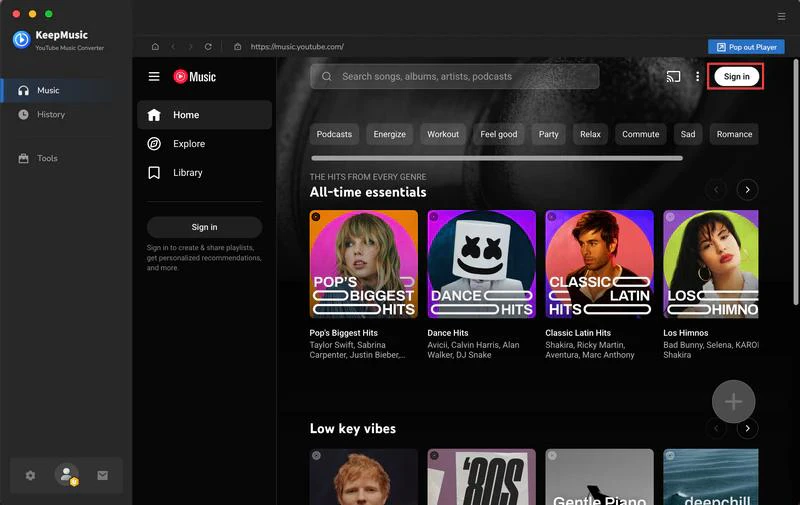
Step 1 Sign In to KeepMusic YouTube Music Converter
Open KeepMusic YouTube Music Converter and click SIGN IN. Log in using your YouTube Music account to access your playlists and library.
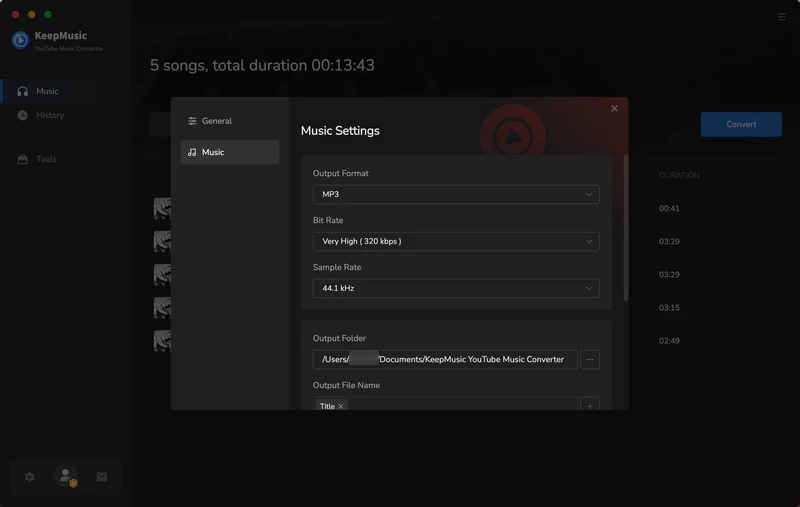
Step 2 Configure Output Settings
Click the Settings icon on the left. Here you can customize your conversion preferences, including:
- Output format: MP3, AAC, WAV, FLAC, AIFF, or ALAC
- Output folder: Choose where your downloads will be saved
- File name format: {Track Number} {Title} {Artist} {Album} {Year} {Playlist Index}
- Output organization: Organize by Playlist, Artist, Album, Artist/Album, Album/Artist, Playlist/Album, or Playlist/Artist
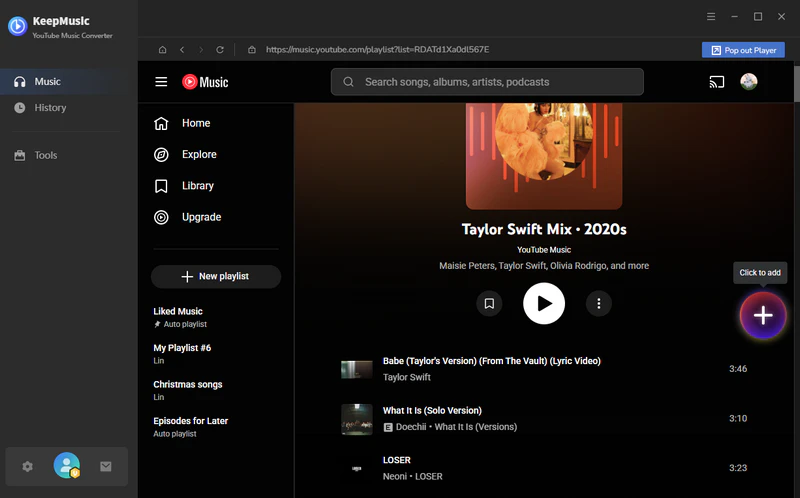
Step 3 Add YouTube Music Content
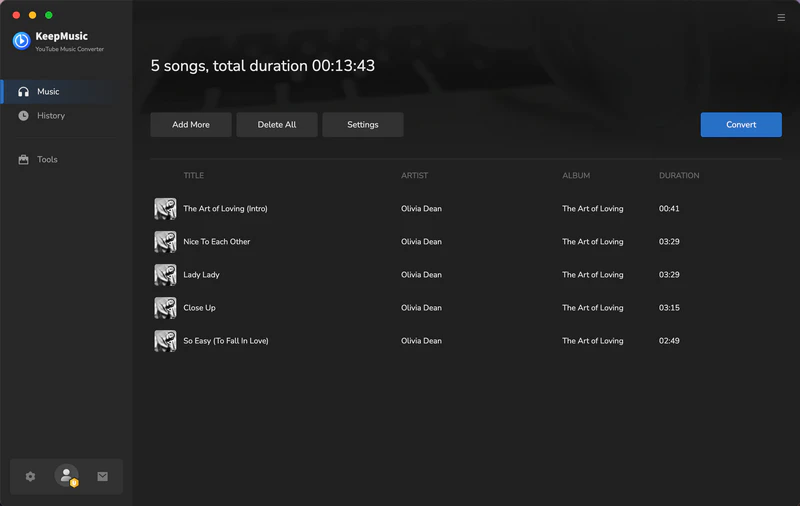
Search for any song, album, or playlist you want to download. Click the floating Add button in the top-right corner. The selected content will appear in the conversion panel. You can select individual songs or choose all items in a playlist to convert at once.
Step 4 Start Converting YouTube Music
Click Convert to begin downloading YouTube Music to your specified output folder. KeepMusic supports up to 10x faster conversion, preserving the original audio quality and metadata.
Step 5 Access Your Downloads
Once the conversion is complete, the output folder usually opens automatically. Alternatively, click the Converted tab to see all downloaded songs. Click the Folder icon next to any track to open its location on your PC or Mac.
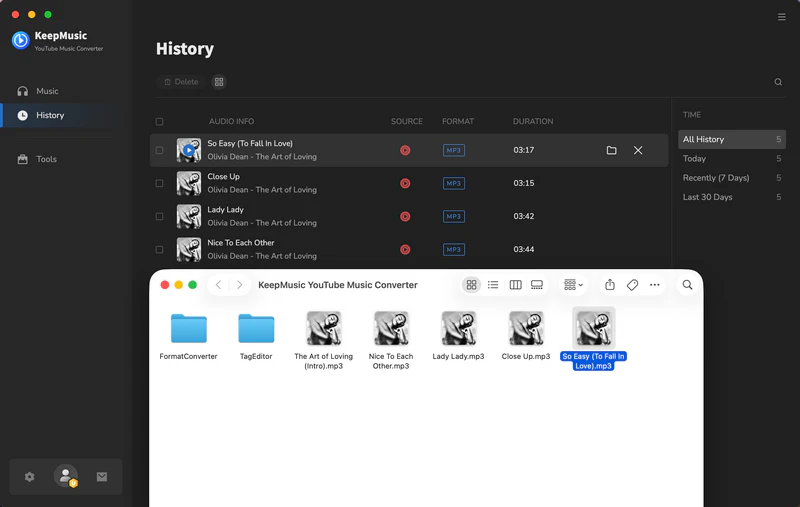
With KeepMusic, you can easily download YouTube Music content in high-quality MP3, AAC, WAV, FLAC, AIFF, or ALAC formats, whether it’s a single song, full album, or entire playlist. Enjoy offline listening anytime, with full control over your library and file organization.
Frequently Asked Questions
1. Are online YouTube to MP3 converters safe?
Many contain intrusive ads, pop-ups, or even malware. KeepMusic is a verified clean desktop application, ensuring a safe conversion experience.
2. Is there a working online YouTube Music to MP3 converter?
Yes, but most online YouTube Music to MP3 converters only support single-song downloads, contain ads, and offer no security guarantees. For reliable, high-efficient conversions, a desktop app like KeepMusic is recommended.
3. Why do online YouTube converters stop working?
Online converters often get blocked due to copyright concerns or server overload. Desktop apps like KeepMusic use different methods that are more stable and reliable.
4. Is KeepMusic safe to use? Does it contain ads or malware?
KeepMusic is 100% safe, ad-free, and does not contain any malware. It’s a professional desktop application with regular updates and secure downloads.
5. Do I need to install the YouTube Music app to use KeepMusic?
No. KeepMusic works independently and does not require the official YouTube Music app. You only need to sign in with your YouTube/Google account within KeepMusic.
6. Can I download YouTube Music without Premium?
Yes. KeepMusic allows you to download YouTube Music to MP3 without a YouTube Music Premium subscription. You can convert and save any playable content for offline listening.
7. Does KeepMusic support downloading entire playlists?
Yes. KeepMusic supports batch conversion of entire playlists, albums, or selected songs. You can add a full playlist with one click and download all tracks in high quality.
8. How to batch download multiple YouTube Music songs?
KeepMusic supports batch conversion – you can add multiple songs, entire albums, or full playlists and download them all at once with 10x faster conversion speed.
9. Can I listen to downloaded songs on any device?
Yes. Once converted to MP3 or other supported formats, you can transfer the files to smartphones, tablets, MP3 players, car stereos, or any other device that supports audio playback.
10. Is KeepMusic YouTube Music Converter free to try?
Yes, KeepMusic offers a free trial that allows you to test its main features. During the trial, you can download the first minute of each song to evaluate the software before deciding whether to purchase the full version.